Best Construction ERP: How Contractors Choose A System That Actually Works
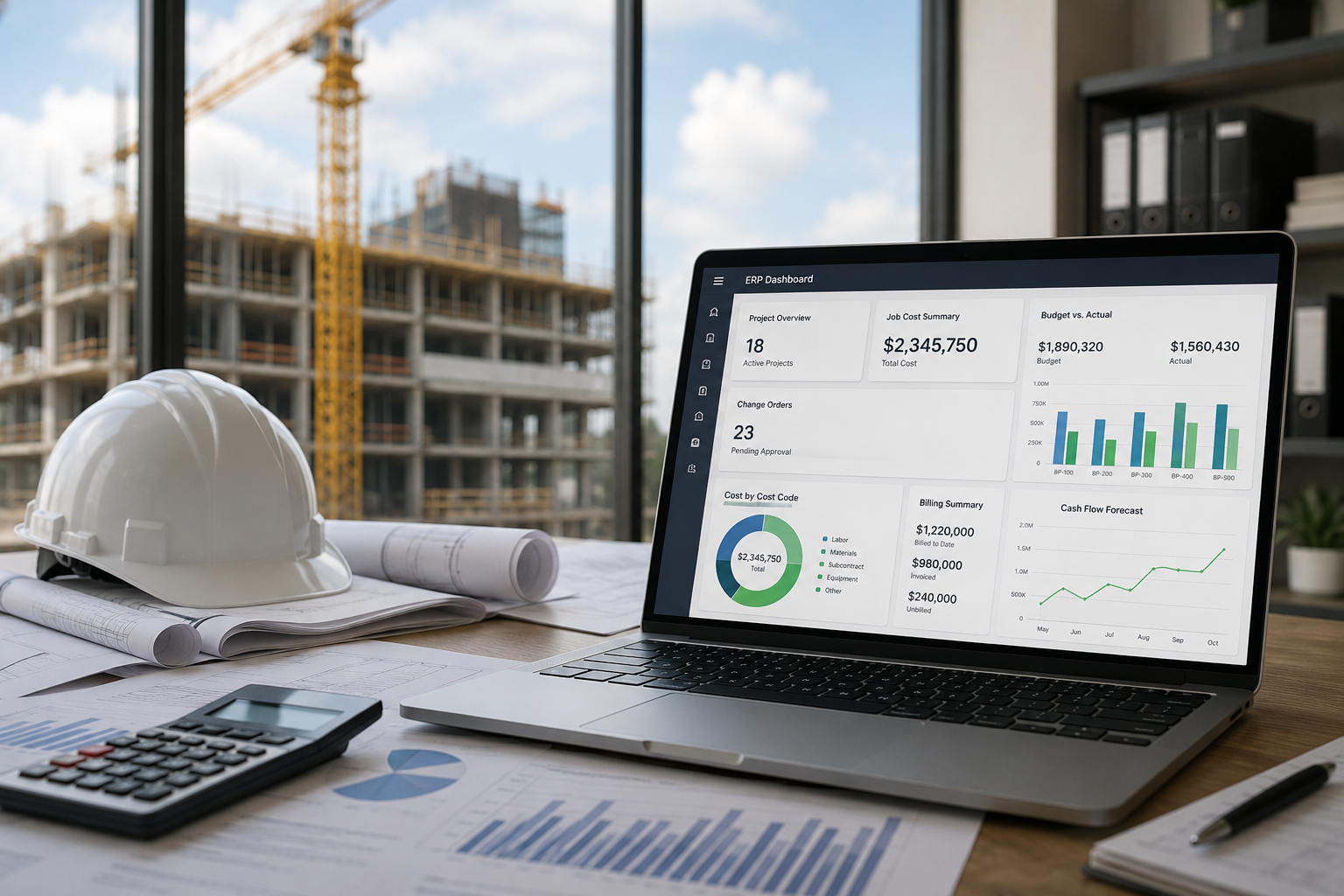
Construction companies don’t usually start looking for new software because everything is calm. They start looking because the business has outgrown the tools that once felt good enough. QuickBooks, spreadsheets, standalone scheduling apps, email approvals, and disconnected project management systems can work for a while, but growth eventually exposes every weak spot. Jobs get more complex, billing slows down, cost reports arrive too late, and leadership starts making decisions from numbers nobody fully trusts.
That’s the real conversation behind choosing the best construction ERP. It isn’t about chasing another shiny platform or buying more software than your team needs. It’s about building a cleaner operating system for how work actually gets sold, staffed, built, billed, reported, and improved. Contractors need systems that respect the field, support accounting, help project managers move faster, and give leadership the confidence to scale without guessing.
Why Construction Companies Outgrow Basic Tools
Most construction companies don’t replace their systems all at once. They stack tool after tool until the stack becomes part of the problem. Accounting works in one place, project managers track updates elsewhere, schedules live in another system, and leadership waits for manually rebuilt reports before they can see what’s really happening. That setup might survive when the company is small, but it starts to break once project volume, team size, and reporting needs increase.
The problem isn’t always that the tools are bad. The problem is that they weren’t built to carry the full weight of a growing construction operation. A contractor may start with QuickBooks and spreadsheets because they’re familiar, affordable, and easy to control. Then the company adds more jobs, more people, more contract types, more cost codes, more approvals, and more billing complexity. Suddenly, the team is spending more time moving information around than using it.
Common signs show up before the breaking point gets expensive:
- Job cost reports arrive too late to help project managers course-correct.
- Accounting and operations work from different numbers.
- Change orders get approved in the field but don’t reach billing fast enough.
- Leadership needs manual reports to understand margin, backlog, and cash flow.
- Teams keep re-entering the same information across multiple systems.
This is where construction ERP software starts to make sense. The goal is not to create a bigger administrative burden. The goal is to connect the parts of the business that already depend on each other, so the office, field, project team, and leadership group are no longer working from separate versions of the truth.
What A Strong Construction ERP Should Bring Together
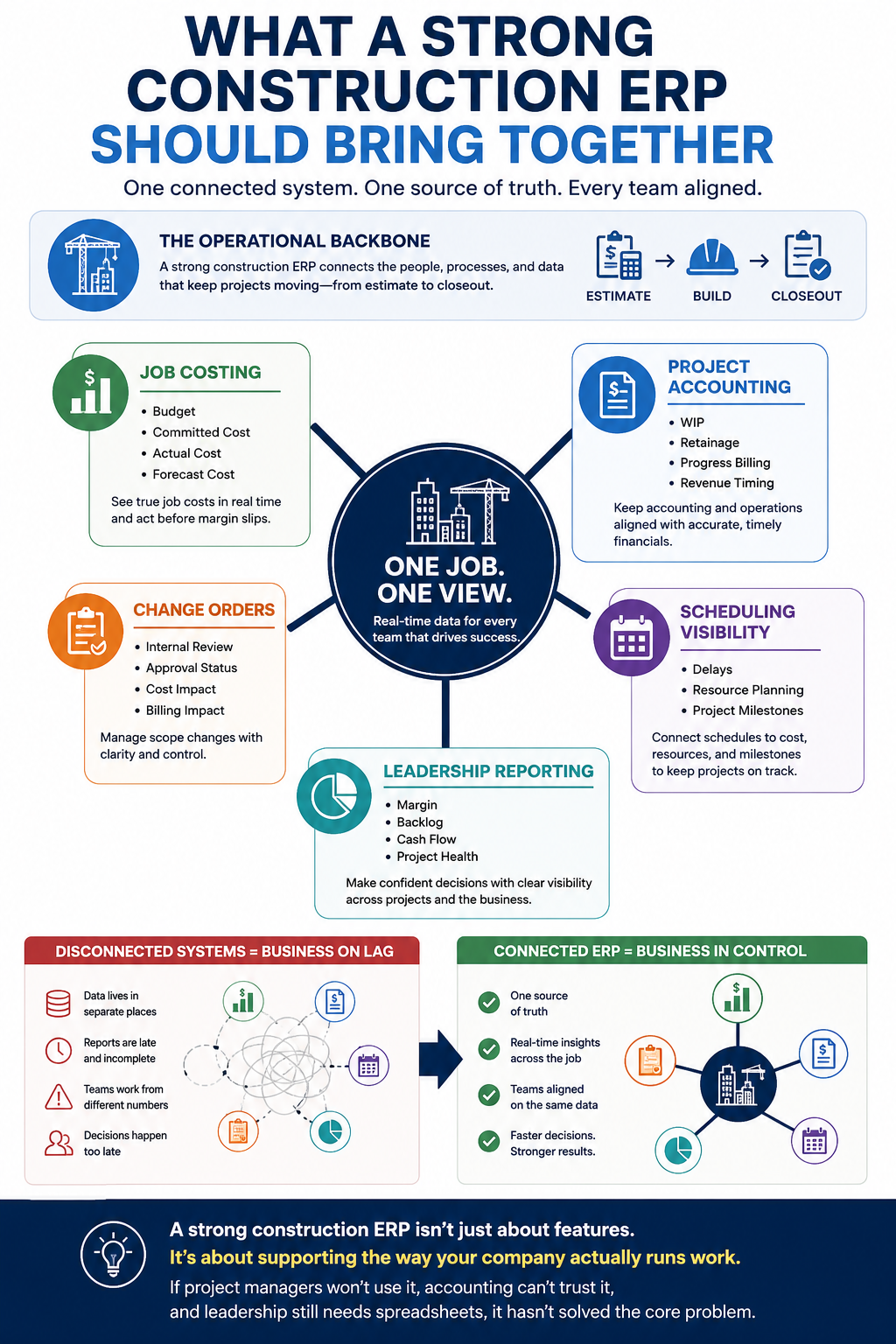
A strong construction ERP should act like the operational backbone of the company. It should connect financials, job costing, project management, billing, scheduling visibility, purchasing, reporting, and team workflows in a way that supports how contractors actually operate. That means it can’t be a generic accounting system with a construction label slapped on top. It has to support the real movement of a job from estimate to closeout.
Construction work creates constant motion. Costs hit before revenue. Change orders reshape scope. Labor availability affects schedules. Materials delays affect production. Billing depends on approvals, backup, progress, and contract structure. If those items live in disconnected places, the business runs on lag. A connected ERP gives each team a clearer view of the same job, with role-based information that fits their work.
A practical system should help teams manage:
- Job costing, including budget, committed cost, actual cost, and forecast cost.
- Project accounting, including WIP, retainage, progress billing, and revenue timing.
- Change orders, including internal review, approval status, cost impact, and billing impact.
- Scheduling visibility, including delays, resource planning, and project milestones.
- Leadership reporting, including margin, backlog, cash flow, and project health.
Contractors evaluating ERP for the construction industry workflows should look beyond a feature checklist. The better question is whether the system can support the way the company actually runs work. If project managers won’t use it, accounting can’t trust it, and leadership still needs spreadsheets, the platform hasn’t solved the core problem.
Job Costing Should Sit At The Center Of The Decision
Job costing is where construction profitability gets protected or lost. If job costs are late, incomplete, or split across too many tools, project teams end up reacting after the damage is already done. Good cost tracking isn’t only about closing the books cleanly after a project ends. It’s about giving teams a clear view while the job is still active, so they can catch risk earlier and make better decisions before margin disappears.
A contractor needs to see more than actual cost. The real picture includes original budget, approved changes, pending changes, committed costs, open purchase orders, subcontract exposure, labor, equipment, invoices, and forecasted cost to complete. A system that only shows part of that picture forces project managers to fill in the gaps themselves. That usually means spreadsheets, side conversations, and reports that don’t match finance.
BlueCollar’s approach to NetSuite construction job costing focuses on connecting the numbers that teams already need to manage. Cost codes, phases, commitments, actuals, and forecasts all need to work together. Project managers should be able to see where a job stands without waiting for accounting to assemble the story. Finance should be able to trust the information without having to chase the field for context.
Strong job costing supports more than project management. It improves estimating because historical cost data becomes cleaner. It improves forecasting because PMs can update expected outcomes with better information. It improves billing by making it easier to track approved scope and cost movements. It also gives leadership a stronger read on which jobs, teams, clients, and project types are actually driving profitable growth.
Scheduling, Field Updates, And Project Visibility Need To Connect
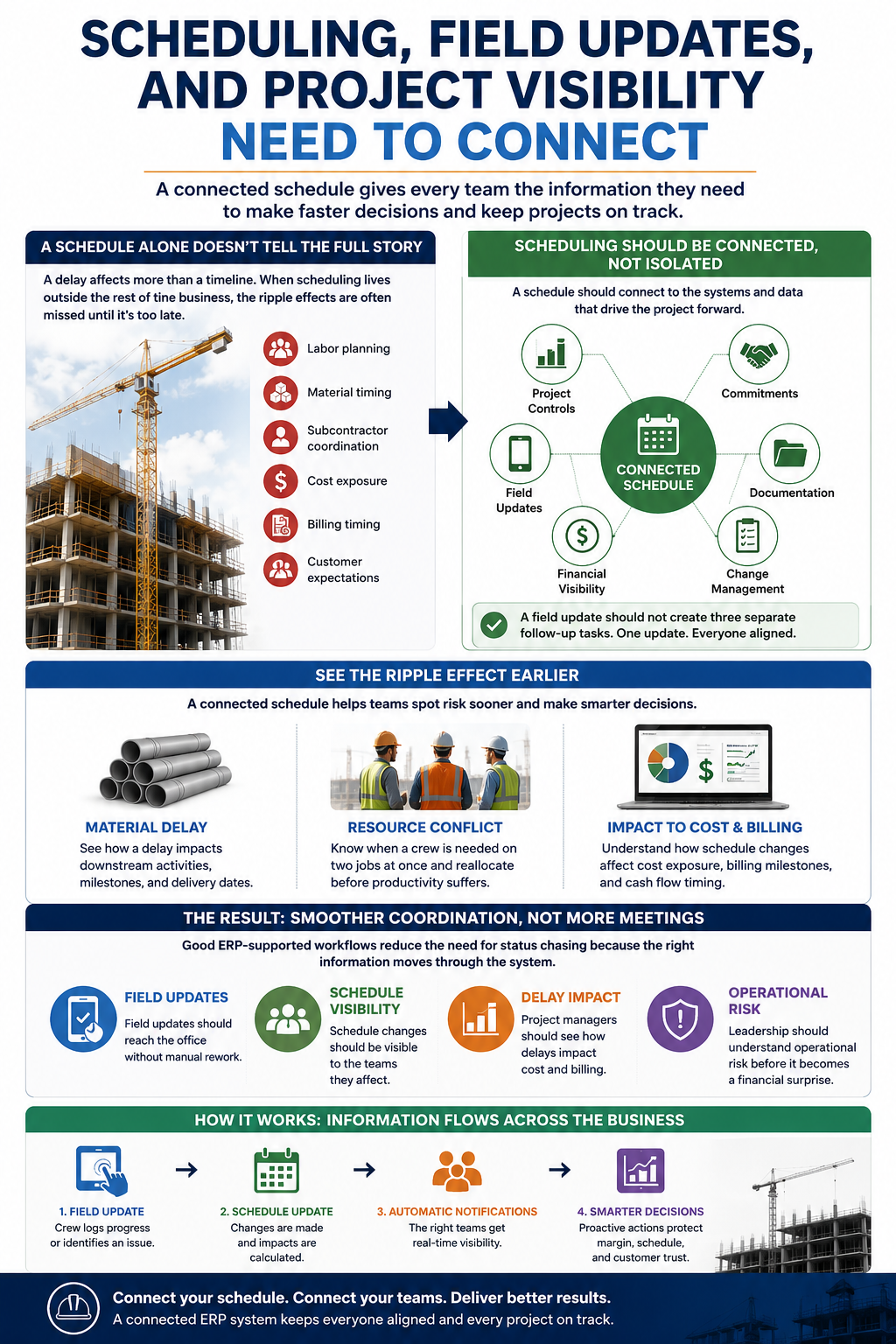
Schedules matter, but a schedule sitting by itself doesn’t tell the full story. A delay affects labor planning, material timing, subcontractor coordination, cost exposure, billing timing, and customer expectations. If scheduling lives outside the rest of the business, those impacts become harder to see early on. The project team might know something changed, but accounting, purchasing, and leadership may not see the ripple effect until later.
That’s why NetSuite construction scheduling tools are part of a larger operational conversation. Scheduling shouldn’t be treated like a calendar floating above the business. It should connect to project controls, commitments, documentation, and financial visibility. A field update should not create three separate follow-up tasks just to get the office aligned.
A connected schedule helps contractors spot risk sooner. If a material delay pushes work back, the team can see how that affects downstream activities. If a crew is needed on two jobs at once, leadership can make a smarter resource decision. If progress affects billing, the accounting team can prepare in advance rather than waiting for a rushed end-of-month update.
The goal is smoother coordination, not more meetings. Good ERP-supported workflows reduce the need for status chasing because the right information moves through the system:
- Field updates should reach the office without manual rework.
- Schedule changes should be visible to the teams they affect.
- Project managers should see how delays impact cost and billing.
- Leadership should understand operational risk before it becomes a financial surprise.
Accounting And Operations Should Not Run In Separate Worlds
Construction accounting has its own rhythm. Retainage, WIP, progress billing, change orders, committed costs, and revenue recognition all create moving parts that don’t fit neatly into basic accounting workflows. The challenge gets bigger when accounting is separated from project execution. Finance needs accurate project information to bill, close, forecast, and report. Project teams need accurate financial information to manage the work.
When those groups operate in separate systems, friction becomes normal. Accounting asks for backup. Project managers chase approvals. Billing waits on documentation. Leadership asks for reports that require manual cleanup. Everyone works hard, but the process still feels slower than it should. That isn’t a people problem. It’s a systems problem.
A connected approach to construction accounting and operations integration provides a cleaner workflow for both sides. Approved change orders should connect to billing. Committed costs should appear in project visibility. Invoices should tie back to jobs, phases, and cost codes. Retainage should be tracked clearly. WIP reporting should not feel like a monthly reconstruction project.
This connection helps contractors protect cash flow. Billing delays are often operational delays in disguise. If project progress, documentation, approvals, and costs don’t reach accounting cleanly, invoices go out slower. That delay can create real pressure, especially for contractors carrying labor, materials, and subcontractor costs across multiple active jobs. Better system design gives the business more control over the timing and accuracy of its cash cycle.
How Leadership Should Evaluate The Best Construction ERP
Leadership has to evaluate ERP from a wider angle than individual features. The best construction ERP should support the company’s current workload and the next stage of growth. A system that works for today but collapses under tomorrow’s reporting, project volume, or entity structure will only push the same decision a few years down the road. ERP is not just a technology buy. It is an operating decision.
Executives should look at scalability, reporting depth, workflow fit, implementation quality, team adoption, and long-term flexibility. A demo can make almost any platform look clean. The real test is whether the system can handle the messy edge cases that happen in construction every week. Change orders, partial approvals, retainage, job cost revisions, subcontract commitments, delayed invoices, and project forecasting all need to be part of the evaluation.
NetSuite ERP leadership strategies for construction should place the focus where it belongs: on business outcomes. Leaders need more than attractive dashboards. They need confidence that the numbers behind those dashboards are accurate, timely, and connected to real project activity. They also need teams that can use the system without feeling as if ERP has added another layer of drag.
A smart evaluation should include the people who live inside the workflows. Finance, project managers, operations leaders, and executives should all have a seat at the table. Each group sees different risks. Finance may focus on close, billing, and reporting. Project managers may focus on cost visibility and speed. Operations may focus on scheduling, handoffs, and field communication. Leadership needs the combined picture.
What To Ask Before Choosing A Construction ERP Platform
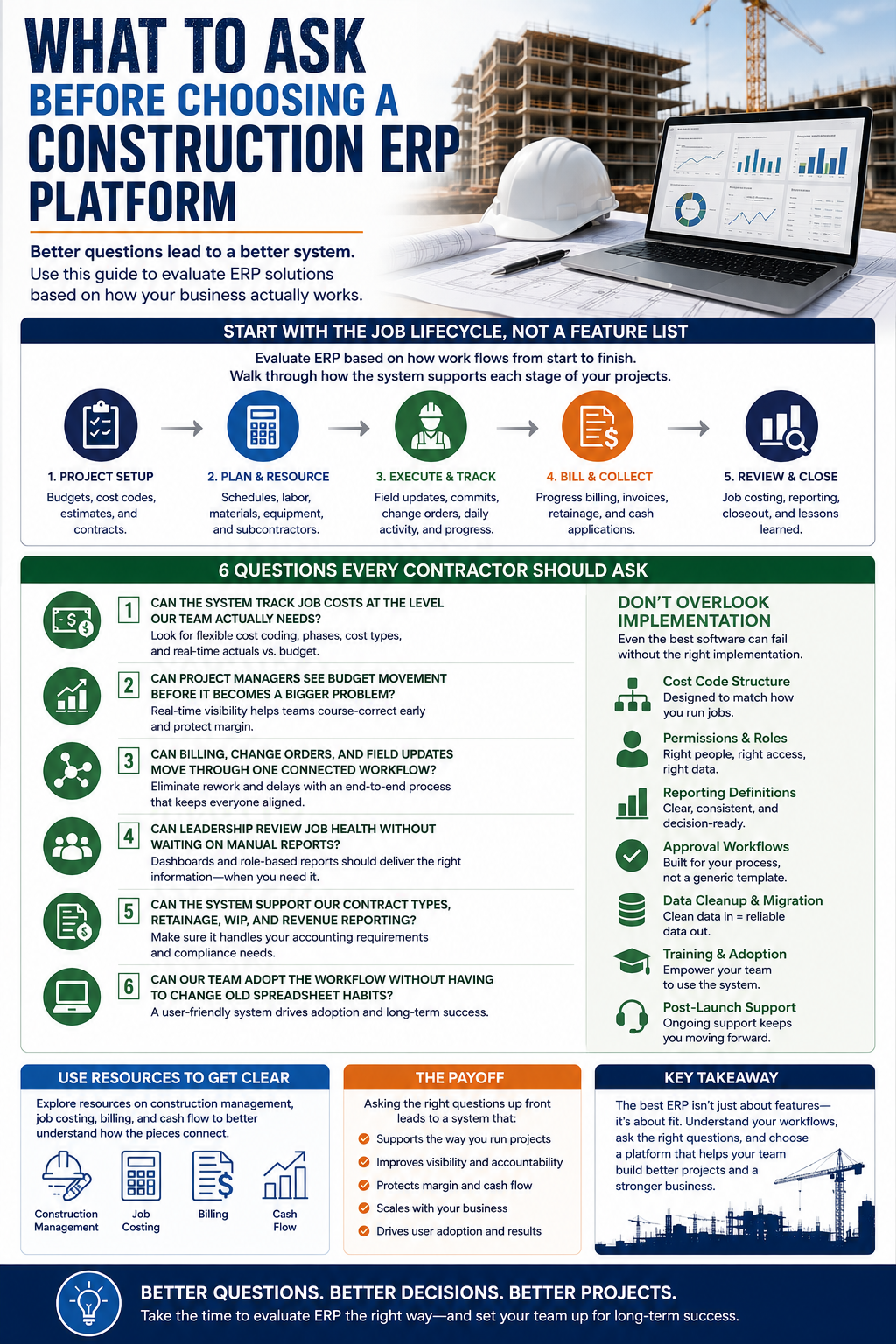
The right questions can save contractors from buying a system that looks strong in a sales meeting but fails in daily use. ERP evaluation should be grounded in the actual job lifecycle, from project setup through closeout. That means walking through how budgets are created, how cost codes are structured, how commitments are tracked, how field updates move, how billing is prepared, and how leadership reviews performance.
Contractors should also think carefully about implementation. The software matters, but implementation design decides whether the system becomes useful. Cost code structure, permissions, reporting definitions, approval workflows, data cleanup, training, and post-launch support all shape the outcome. A rushed implementation can turn a strong platform into another source of frustration.
Use questions like these to keep the process honest:
- Can the system track job costs at the level our team actually needs?
- Can project managers see budget movement before it becomes a bigger problem?
- Can billing, change orders, and field updates move through one connected workflow?
- Can leadership review job health without waiting on manual reports?
- Can the system support our contract types, retainage, WIP, and revenue reporting?
- Can our team adopt the workflow without having to change old spreadsheet habits?
The more clearly the company understands its own workflow pain points, the easier it becomes to evaluate ERP fit. The decision should start with how the business runs, not with a generic feature list.
Where NetSuite And BlueCollar Fit For Construction Teams
NetSuite gives construction companies a powerful ERP foundation. It can support financials, project visibility, reporting, billing workflows, multi-entity growth, and operational control when configured around how contractors actually work. That last part is important. Construction companies don’t need a generic system dropped into the business. They need a system shaped around jobs, phases, cost codes, contracts, approvals, field activity, and leadership reporting.
That’s where BlueCollar comes in. BlueCollar helps construction companies build practical workflows inside NetSuite, with a focus on the parts that affect day-to-day execution and long-term scale. The goal is cleaner job costing, stronger project visibility, better billing control, and fewer manual workarounds. A system should make the business easier to run, not harder to explain.
For contractors evaluating NetSuite for construction, the conversation should include both the platform's capabilities and its fit for implementation. NetSuite can carry complex financial and operational needs, but construction success depends on thoughtful configuration. BlueCollar Projects is built around that practical gap, helping teams connect accounting and project management in ways that support real construction workflows.
The value shows up in everyday work. Project managers get better cost visibility. Accounting gets cleaner data. Leadership gets stronger reporting. Teams spend less time reconciling information and more time managing the business. That kind of system doesn’t remove every challenge from construction, but it gives contractors a stronger foundation to handle complexity without losing control.
Build Cleaner Construction Operations With BlueCollar
If your team is outgrowing disconnected tools, BlueCollar can help you see what a cleaner construction ERP workflow could look like inside NetSuite. The first step is getting honest about where the current process is slowing you down. Job costing, billing, scheduling, accounting, project visibility, and reporting all work better when they’re connected with intent.
BlueCollar works with construction teams that want stronger systems without losing sight of how the field and office actually operate. Talk with BlueCollar about your current workflows, your growth goals, and the reporting problems your team is tired of rebuilding every month. Cleaner operations start with a system designed around the way your business really runs. Get a Demo.
Frequently Asked Questions About Best Construction ERP
What Is The Best Construction ERP?
The right ERP depends on the contractor’s size, project complexity, accounting needs, job costing structure, and growth plans. A smaller contractor may need better cost visibility and billing control first, while a larger firm may need multi-entity reporting, stronger forecasting, and deeper workflow automation. The best fit should connect accounting, project management, job costing, billing, scheduling, and leadership reporting without forcing the team into awkward workarounds. Contractors should evaluate the system against real job scenarios, not just polished demo screens.
What Features Should Construction ERP Software Include?
Construction ERP software should include job costing, project accounting, change order tracking, scheduling visibility, procurement, billing, dashboards, reporting, and role-based access. It should also support retainage, WIP, committed costs, actual costs, forecasts, and progress billing. The system should help project managers and accounting teams work from the same information instead of trading spreadsheets back and forth. If the platform can’t connect project activity to financial impact, it won’t solve the problems most contractors are trying to fix.
Is NetSuite Good For Construction Companies?
NetSuite can be a strong fit for construction companies when it is configured around contractor workflows. The platform has the depth to support financial management, reporting, project visibility, and scalable operations, but the setup has to reflect how construction teams actually manage jobs. BlueCollar helps bridge that gap with workflows designed for job costing, billing, project management, and operational clarity. Contractors can learn more through BlueCollar’s resource on NetSuite for construction companies.
How Does Construction ERP Help With Job Costing?
Construction ERP streamlines job costing by consolidating budgets, commitments, actual costs, invoices, labor, equipment, subcontractors, and forecasts into a single system. That gives project managers a clearer view of where the job stands before the closeout stage. It also helps finance trust the information because the numbers are tied to the same project structure and cost codes. Better job costing helps contractors protect margin, improve estimating, and make stronger decisions while work is still active.
When Should A Contractor Move From QuickBooks To ERP?
A contractor should consider moving from QuickBooks to an ERP system when reporting becomes too slow, spreadsheets become unavoidable, billing gets delayed, and job cost visibility starts to fall behind the pace of work. QuickBooks can serve smaller businesses well, but growing contractors often need more robust project controls and stronger operational integration. If leadership can’t see margin, cash flow, backlog, and job health without manual cleanup, the company may have reached its system limit. BlueCollar’s article on the QuickBooks breaking point covers this shift in more detail.
How Does ERP Improve Construction Billing?
ERP improves construction billing by connecting approved work, change orders, project progress, documentation, retainage, and cost activity. That connection reduces the amount of manual chasing between project managers and the accounting team. Billing becomes easier to prepare because the supporting information is already tied to the job workflow. Contractors can send invoices with more confidence, reduce delays, and gain better control over cash flow.
Does Construction ERP Help Growing Contractors Scale?
Yes, construction ERP can help growing contractors scale by giving the company cleaner systems for project visibility, financial reporting, billing, job costing, and operational control. Growth creates more complexity, and disconnected tools tend to multiply it rather than reduce it. A connected ERP foundation helps teams standardize processes across more jobs, people, departments, and locations. BlueCollar’s resource on construction scaling growth explains how better systems support expansion without creating more chaos.
How Long Does It Take To Choose A Construction ERP?
The timeline depends on company size, stakeholder involvement, process complexity, data readiness, and the team's clarity about its current pain points. A contractor with clean workflows and aligned decision-makers may evaluate options faster than a company with multiple divisions, inconsistent cost codes, and unclear reporting definitions. The key is not speed alone. The company should take sufficient time to test real-world job scenarios, review implementation requirements, and ensure the platform can support daily work after launch.
What Is The First Step In Choosing Construction ERP?
The first step is mapping the current workflow problems before comparing platforms. Contractors should identify where job costing breaks down, where billing slows, where project managers lose visibility, where accounting gets stuck, and where leadership lacks reliable reporting. That internal review gives the team a stronger evaluation lens. Once those pain points are clear, it becomes much easier to choose a system and an implementation partner that can support the business rather than adding another layer of complexity.