NetSuite For Construction Companies: The Practical Playbook For Job Costing, Billing, And Scalable Operations
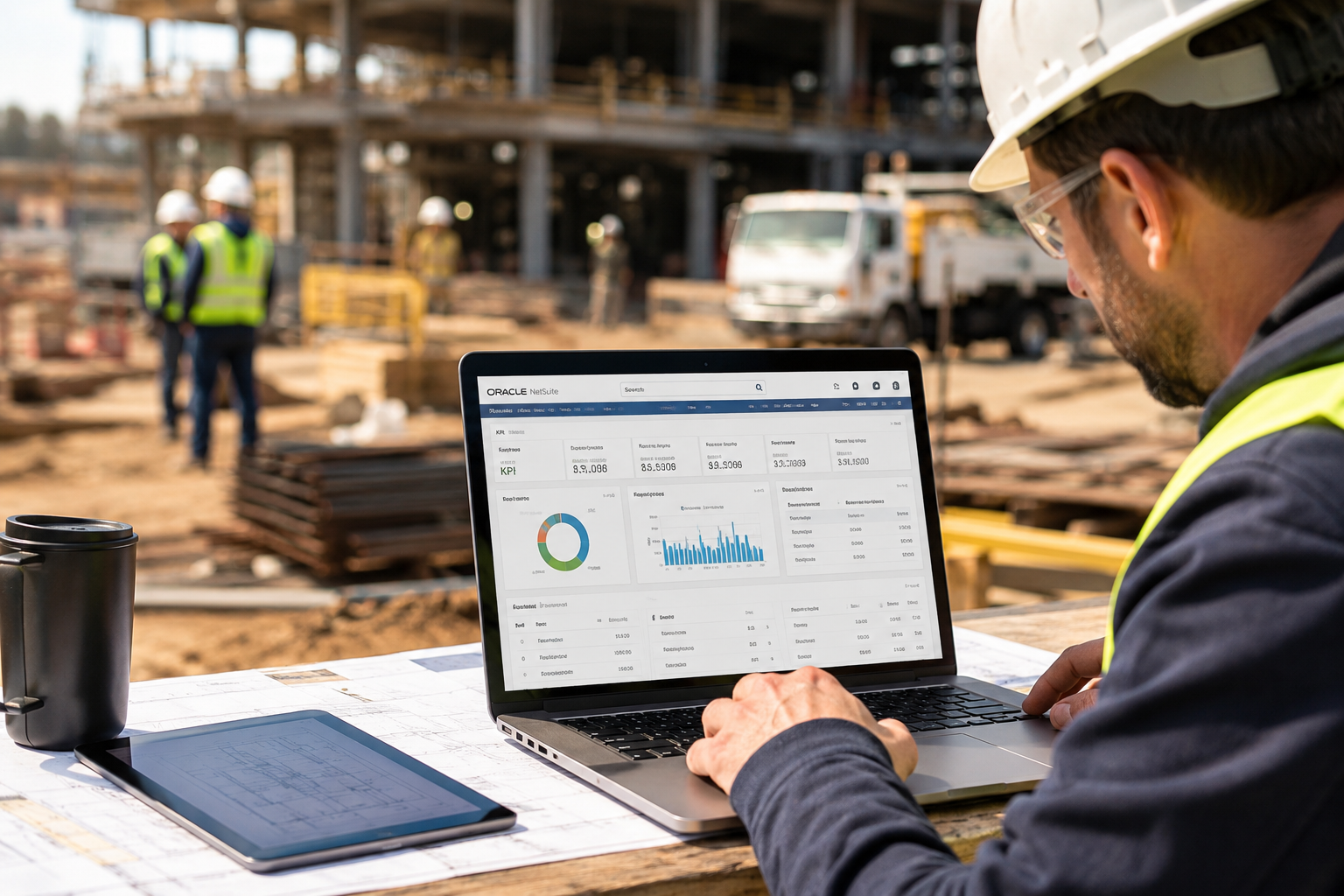
Construction teams don't struggle because they lack effort. They struggle because the information they need to run jobs cleanly is spread across too many systems, too many spreadsheets, and too many "we'll fix it later" processes. Accounting is trying to close the month, project managers are trying to keep crews moving, and leadership is trying to forecast cash without trusting the numbers in front of them. That disconnect shows up in the worst ways: late billing, margin surprises, and jobs that look fine until the final third goes sideways.
This is the lane where NetSuite can make a real difference, especially if it's implemented with construction workflows in mind. NetSuite isn't a magic wand, and it isn't a replacement for strong project discipline. It is a system that connects financials and operations, so your team can make decisions based on what's happening now, not what happened four weeks ago. If you've read any of our construction-focused NetSuite content, you've seen the same theme repeated in different ways: get the fundamentals right, build the workflow around how construction actually runs, and stop relying on fragmented tools that weren't designed for the job.
The Real Problem: Construction Doesn't Have A Data Problem, It Has A Timing Problem
Most construction companies can produce a job cost report. The problem is that the report is often late, incomplete, or coded in a way that makes it hard to trust. Labor might be entered days after it happens. Vendor bills might be assigned to the wrong project or cost code. Change orders might live in email threads until someone remembers they exist. Schedules might be managed in a tool with no connection to committed costs or production realities. All of this creates a gap between what the job is doing and what leadership can see.
That's the operational cost of disconnected systems. It shows up as rework, constant clarification, and a lot of "let me get back to you" moments that burn time across every role.
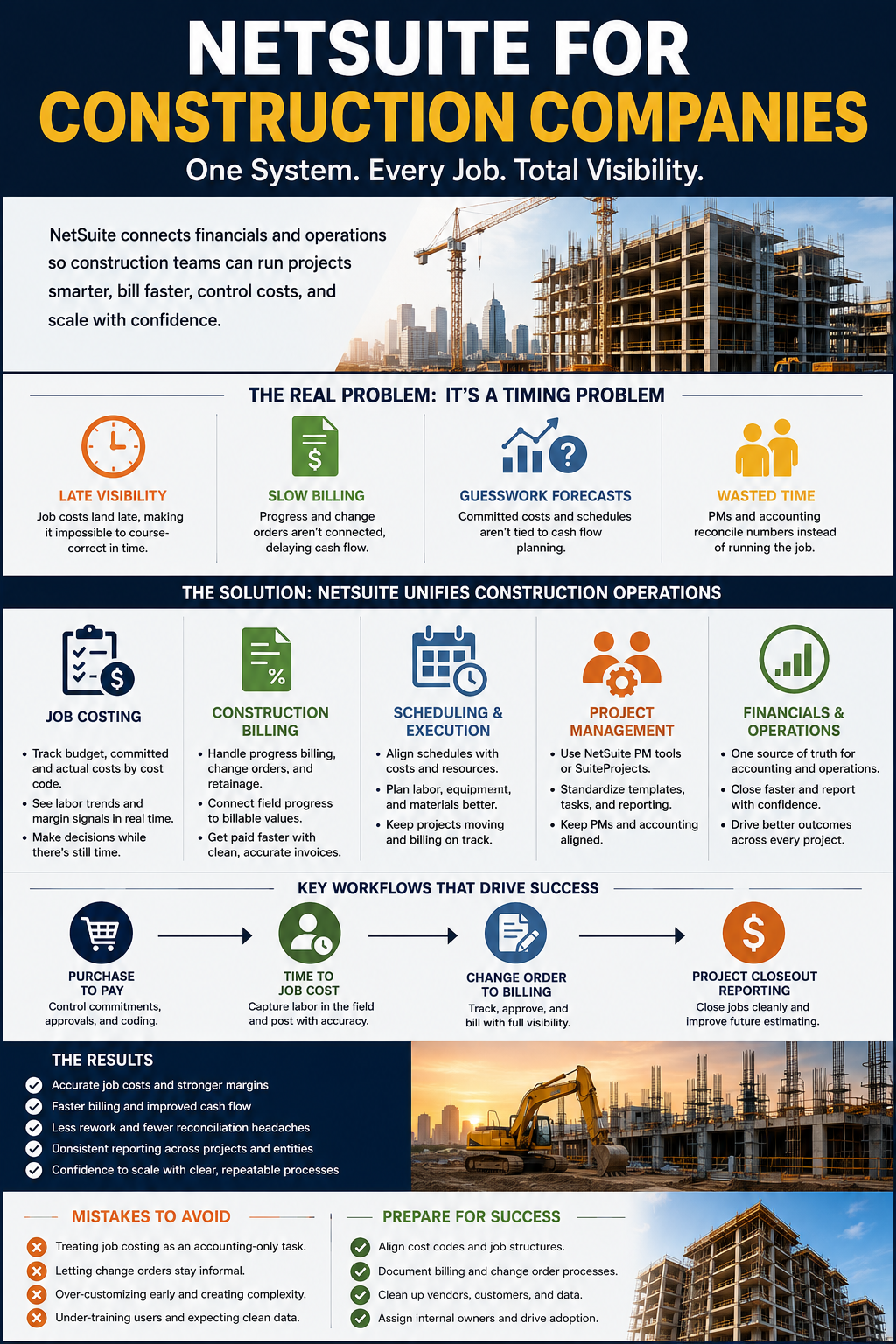
Here are a few patterns we see again and again in growing construction teams:
- Job cost visibility lags behind the field, so corrective action comes too late to protect the margin.
- Billing takes longer than it should because progress and change control aren't connected to the financial workflow.
- Forecasting becomes guesswork because committed costs and schedule realities aren't tied to cash flow planning.
- PMs and accounting waste time reconciling numbers instead of pushing the job forward.
If those feel familiar, you're not alone. It's also why many teams hit a breaking point with entry-level accounting systems and scattered point solutions, especially once project volume and staffing complexity start rising.
What NetSuite Is And Why Construction Teams Look At It
NetSuite is an ERP that brings financials, operational data, reporting, and process controls into one unified system. In construction terms, the value is simple: fewer disconnected tools, fewer manual handoffs, and more consistent visibility into jobs, costs, and billing.
That's also why the phrase "NetSuite for construction companies" shows up in so many searches. Teams aren't looking for "software." They're looking for control. They want to know what each job is costing, what's committed, what's billable, what's stuck, and what needs attention before the month closes.
NetSuite can support those outcomes, but the win isn't just picking the platform. The win is building the workflow so that job costing, billing, project management, and scheduling don't operate like separate departments. You want the same story to be true across the business: the same job structure, the same cost codes, the same contract rules, and the same reporting logic.
The Outcomes That Matter Most In Construction ERP
Construction companies don't adopt ERP to "modernize." They adopt ERP because the business starts demanding more discipline than their current setup can support. Before talking about features, it helps to define the outcomes that actually move the needle.
Strong NetSuite outcomes in construction typically include:
- More reliable job cost reporting, with less time spent chasing missing data.
- Faster and cleaner billing cycles, including change orders and retainage handling.
- Better cash visibility across projects, including committed costs and expected collections.
- Standardized workflows that scale as you add project volume, regions, and teams.
- Less friction between project teams and accounting, because the system supports both.
These aren't abstract. They show up as fewer margin surprises, fewer rushed billing pushes, and fewer "we didn't know" moments at the executive level.
Job Costing That Holds Up In Real Life
Job costing is the center of gravity for construction operations. It's the mechanism that tells you whether your estimate is holding, whether production is trending in the right direction, and whether you still have time to correct course. It's also one of the most common failure points when companies try to grow without upgrading their systems and processes.
The issue usually isn't that job costing is missing. The issue is that job costing isn't accurate enough to trust. If labor arrives late, if materials are coded inconsistently, or if committed costs aren't visible, the report becomes a lagging indicator. At that point, job costing becomes a post-mortem tool rather than a management tool.
A construction-ready job costing setup should let you see:
- Original budget, committed cost, and actual cost at the cost code level.
- Cost impacts tied to change orders are not floating in the background until month-end.
- Labor trends in time to course-correct while the job still has runway.
- Margin signals that match the field reality, not just the accounting close.
The biggest mindset shift is to treat job costing as a workflow, not a report. The report only reflects the workflow. If the workflow is loose, the report will be loose.
Construction Billing That Doesn't Turn Into A Weekly Emergency
Billing is where many construction companies feel the pain most immediately. It's also where operational gaps become financial risk. You can have a strong backlog and still struggle to fund growth if billing gets stuck behind unclear progress, missed change orders, or messy approvals.
Construction billing has real complexity: progress billing, time and materials, retainage, change orders, and contract-specific rules that change from owner to owner. In a disconnected environment, billing becomes a manual assembly process. Someone is pulling percent complete from one place, committed cost from another, change order status from email, and invoice formatting from a template that lives on a shared drive. That's not a scalable model.
A NetSuite-centered billing workflow can reduce that chaos if you build the job and contract structure correctly and keep change control tight.
Here's what a more controlled billing process tends to include:
- Clear linkage between job budgets, approved change orders, and billable values.
- A consistent review and approval flow so billing doesn't stall waiting on tribal knowledge.
- Visibility into retainage tracking to keep cash planning grounded.
- Faster reconciliation between what the field says is complete and what the contract allows you to invoice.
Scheduling Visibility That Connects To The Business, Not Just The Calendar
Scheduling is often treated like a project management responsibility and nothing more. In reality, scheduling is a financial driver. The schedule impacts labor demand, equipment planning, procurement timing, subcontractor coordination, and the billing calendar. If your schedule is disconnected from cost and progress visibility, you end up with avoidable inefficiencies: crews waiting, materials arriving at the wrong time, and billing that lags due to milestones not being tracked cleanly.
NetSuite itself isn't "a scheduling app," and that's not the point. The point is to make the schedule and project status visible enough that leadership can understand what's likely to happen next and project teams can coordinate without flying blind.
The most practical benefits come from connecting project execution signals to the broader workflow, such as:
- Better planning for labor and staffing, tied to real project load and timelines.
- Cleaner handoffs between procurement and the field, so long-lead items don't become surprises.
- More predictable billing timing, because milestones and progress are tracked consistently.
Project Management In NetSuite And Where SuiteProjects Fits
Project management is a broad category, and construction teams often ask the same question: what do we use inside NetSuite, and what do we keep outside it? That's a fair question. Some companies want project visibility and controls centralized. Others want to keep certain field tools but still drive reporting and financial alignment through NetSuite.
SuiteProjects often comes up in that conversation, especially for teams trying to standardize project templates, task visibility, and delivery reporting. The key is to evaluate what your team actually needs to run jobs better, not just what sounds good on a feature list.
A helpful starting point is understanding how NetSuite project management and SuiteProjects differ, and how construction teams typically choose between them.
The goal isn't to add a new layer of complexity. The goal is to create consistent execution and reporting across projects, so PMs aren't reinventing the wheel every time they start a job.
The Biggest Win: Accounting And Operations Sharing One Source Of Truth
In construction, friction between accounting and project teams isn't about personalities. It's about mismatched systems and timing. Accounting needs clean coding, approvals, and documentation. PMs need speed, flexibility, and the ability to keep the job moving. If the system forces one side to work in a way that doesn't fit, both sides start building workarounds. Workarounds are where errors and delays multiply.
When NetSuite is implemented with construction workflows in mind, the business can operate from one source of truth. That's when things start getting easier across roles.
Here's what that tends to look like in day-to-day reality:
- PMs can see costs and billing status without having to chase someone for a report.
- Accounting closes faster because approvals and coding are more consistent.
- Leadership can trust margin reporting because the underlying inputs are cleaner.
- Teams spend less time reconciling and more time managing work.
Practical Workflows You Should Map Before Implementation
Implementation success often comes down to a few workflows that drive most of the operational value. Teams get into trouble when they focus too much on "modules" and not enough on the real sequences of work that happen every week.
A strong pre-implementation step is mapping the workflows that move money and information across the business. That mapping should include who owns each step, what "done" looks like, and what data needs to be captured early so the job cost and billing story stays accurate.
The workflows that usually deserve the most attention include:
- Purchase to pay, including commitments, approvals, and coding standards.
- Time capture to job cost, including how labor moves from the field into cost visibility.
- Change order initiation to approval to billing, including status tracking and audit trail.
- Project closeout reporting, so the lessons from completed jobs feed back into estimating.
Growth Without Chaos: What Scaling Looks Like With NetSuite
Construction growth is rarely clean. You add projects, add people, add regions, and suddenly your previous "this works for now" setup breaks. Reporting becomes inconsistent. Teams create their own tracking systems. Leaders can't get a unified view without waiting on manual rollups. Cash gets tight because billing cycles don't keep pace with volume.
NetSuite can support growth, but the real advantage comes from standardization. You want repeatable project structures, consistent cost coding, and consistent billing processes that don't depend on specific individuals to keep the wheels on.
Mistakes That Make NetSuite Feel Like "Just Another System"
ERP projects fail for predictable reasons. It's rare because the platform can't do the job. It's usually because the workflow wasn't built around construction reality, adoption wasn't managed, or the company tried to solve process problems with configuration alone.
Here are common pitfalls we see, especially in growing construction teams:
- Treating job costing like an accounting-only task instead of a field-to-office workflow.
- Allowing change orders to stay informal, then expecting billing to magically become clean later.
- Over-customizing early, which can create upgrade pain and long-term complexity.
- Training too lightly, which leads to inconsistent data and "the system is wrong" frustration.
A Quick Reality Check: What Success Looks Like After Go-Live
A successful NetSuite rollout in construction doesn't mean everything feels perfect on day one. It means the business starts gaining control and consistency quickly, and that control compounds over time.
You should expect to see:
- Cleaner job cost reporting that becomes more accurate as the workflow stabilizes.
- Shorter billing cycles because the inputs are less scattered and approvals are clearer.
- Better cash visibility because committed costs and billing progress are easier to track.
- Less internal friction because teams share one structure for jobs, costs, and status.
That's not theory. It's what happens when construction discipline is embedded into the system design instead of bolted on later.
Make The System Serve The Job, Not The Other Way Around
Construction is too fast and too complex for disconnected tools and delayed reporting to keep up forever. If you're serious about protecting margin, billing faster, and scaling without chaos, your systems need to support the way work actually moves through a project. NetSuite can be that backbone, but the outcome depends on building construction-ready workflows that your team will actually follow.
If you're exploring NetSuite for construction companies, keep the focus on execution: job structure, cost coding, change control, billing discipline, and clean visibility from field to office. Get those right, and the platform stops feeling like "another system" and starts feeling like control.
Talk With BlueCollar About A Construction-Ready NetSuite Approach
If you're evaluating NetSuite and want it to support how construction actually runs, the next step is a focused conversation about workflows, job structure, and the reporting outcomes you need. The goal isn't a "software demo" experience. The goal is clarity on how job costing, billing, and project visibility can work together without creating new headaches.
Find out how BlueCollar can help streamline your NetSuite-powered construction project. Get Your Demo Now.
Frequently Asked Questions About NetSuite For Construction Companies
What Does NetSuite Replace For A Construction Company?
NetSuite can replace disconnected accounting systems, fragmented purchasing workflows, and a lot of spreadsheet-based reporting that doesn't scale. The biggest change is consolidation, in which financials and job-level operational data live within a single, consistent structure. Many teams still keep certain field tools, but they are no longer relying on scattered systems to tell the financial story of a project. The practical goal is fewer manual handoffs and fewer arguments about which numbers are correct.
Is NetSuite Good For Job Costing In Construction?
NetSuite can support robust job costing, but accuracy depends on the workflow feeding it. Cost codes need to be consistent, committed costs need to be visible, and labor capture needs to be timely enough to support real management decisions. If time and vendor costs arrive late or are coded inconsistently, job cost reports will lag, and trust will drop quickly. A construction-ready approach focuses on process ownership first, then configuration.
Can NetSuite Handle Progress Billing And Retainage?
Yes, but construction billing only feels "easy" when the underlying project and contract structure is tight. Progress billing depends on clean tracking of what's complete, what's approved, and what's billable under the contract rules. Retainage adds another layer of tracking that impacts cash forecasting and collections follow-up. The teams that win here are the ones that treat change orders as a controlled workflow rather than an informal side process.
What Is The Difference Between NetSuite Project Management And SuiteProjects?
NetSuite includes project management capabilities, and SuiteProjects adds additional structure for certain project delivery needs. The right choice depends on how your team wants to manage tasks, templates, resource visibility, and reporting across projects. Construction teams often prioritize practical execution: clear status, consistent templates, and reporting that aligns with financials. If you're weighing both options, start with the comparison resources and map the workflow your PMs actually follow.
How Does NetSuite Help Reduce Construction Costs?
Cost reduction usually comes from visibility and control, not a single feature. When committed costs, actual costs, and job progress are visible in a consistent structure, teams can correct course earlier. Procurement becomes more disciplined because commitments and approvals are tracked cleanly. Field and office teams stop burning hours reconciling numbers, and that time gets redirected into proactive job management.
How Long Does A NetSuite Implementation Take For Construction Companies?
Implementation timelines vary widely depending on scope, company structure, and the cleanliness of your existing data and workflows. Multi-entity setups, complex billing rules, and inconsistent cost coding can extend timelines if they aren't addressed early. Teams that map workflows upfront and assign real internal ownership typically move faster with less rework. The best way to get a realistic timeline is to define what "phase one" needs to include and what can wait.
What Should We Prepare Before Moving To NetSuite?
Start with your job structure and cost codes, since that impacts job costing, reporting, and billing. Document how change orders are initiated, approved, and billed, including who owns each step. Clean up vendor, customer, and item data so the system doesn't inherit old messes. Assign internal owners for the workflows that matter most, because adoption depends on people, not just configuration.
Does NetSuite Work For Both GCs And Specialty Contractors?
Yes, but the workflow needs differ. GCs often care deeply about contract management, progress billing, and project-wide coordination, while specialty contractors may focus more on labor tracking, production visibility, and tight, granular job cost control. NetSuite can support both, but the configuration and reporting approach should match how the company estimates, schedules, and bills. The companies that get the most value treat it as an operational system, not just an accounting system.
How Do We Know If We've Outgrown QuickBooks?
A common signal is that your team can't get timely, trustworthy job cost visibility without manual work. Billing is taking longer as project volume rises, and collections planning is getting harder because cash visibility is unclear. Multi-entity complexity, reporting limitations, and increasing reconciliation work also surface quickly as you grow. If the business depends on spreadsheets to explain what the accounting system can't show, it's usually time to consider a stronger platform.