Construction Cost Tracking Software For Contractors Who Want Cleaner Jobs And Cleaner Books

Most projects don't go sideways in a single dramatic moment. They drift. A few extra labor hours here, a rush material order there, a change order that never gets priced correctly, and suddenly your margin is gone before anyone wants to say it out loud.
The frustrating part is that you usually had enough signals to prevent it. The signals just weren't visible in one place, at one time, to the people who needed them. If your job cost picture only becomes clear at month-end, you're steering a project through the windshield with a fogged-up window.
This is the gap that modern cost tracking closes. It's not about "more reports." It's about giving project teams and finance teams the same numbers, fast enough to act on them.
What Construction Cost Tracking Software Actually Does
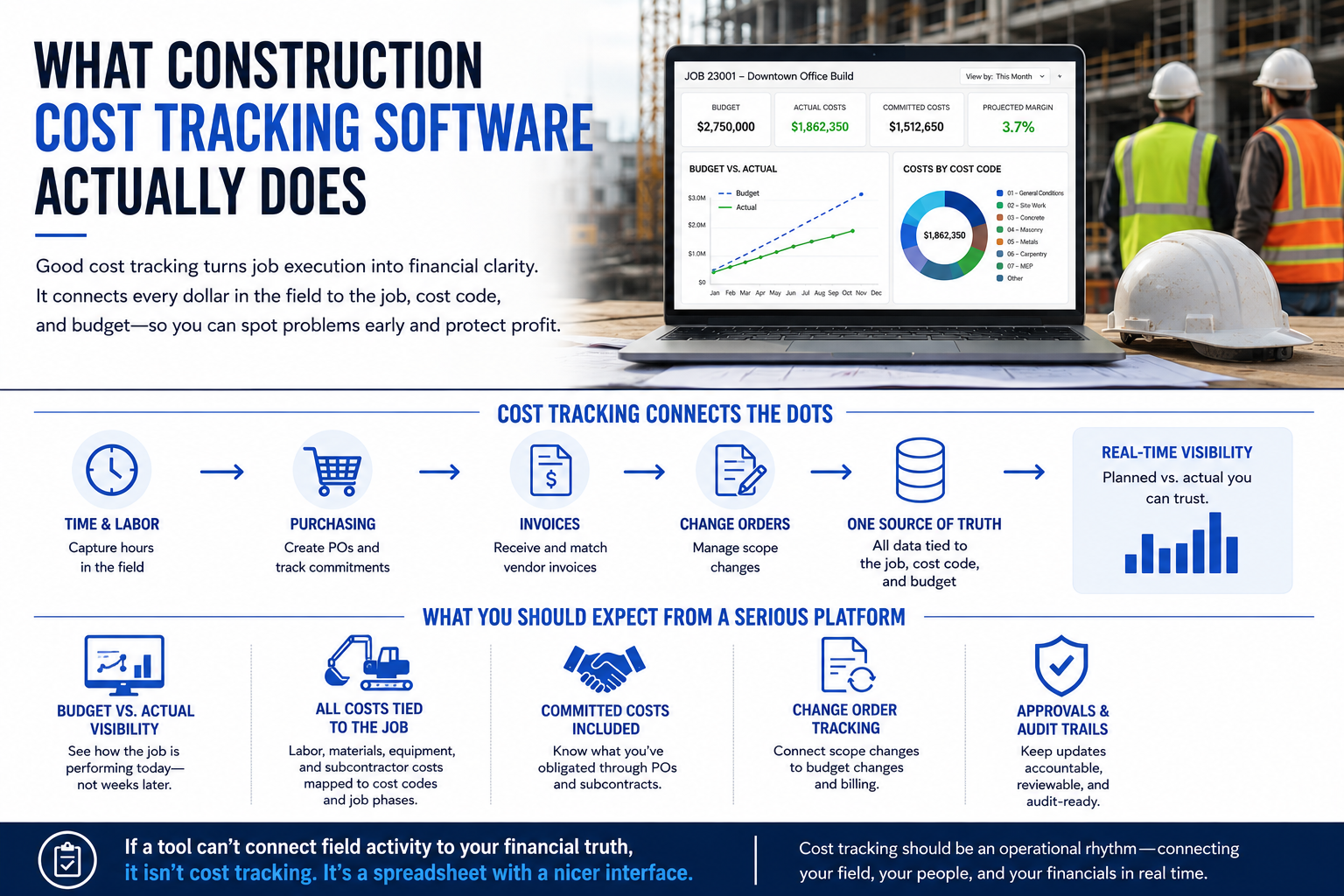
At a practical level, good cost tracking turns job execution into financial clarity. It takes the messy reality of time, purchasing, invoices, and change orders and ties them back to the job, the cost code, and the budget. That creates a living snapshot of planned vs. actual, with enough detail to spot problems early.
The best systems don't treat cost tracking as a back-office exercise. They treat it as an operational rhythm. Supers, PMs, and accounting all contribute to the same dataset, and the system maintains a consistent structure so the numbers can be trusted.
Here's what you should expect from a serious platform:
- Budget vs. actual visibility that updates as the job moves, not weeks later.
- Labor, materials, equipment, and subcontractor costs tied to cost codes and job phases.
- Committed costs that reflect what you've obligated through POs and subcontracts.
- Change order tracking that connects scope changes to budget changes and billing.
- Approvals and audit trails so updates are accountable and reviewable.
If a tool can't connect field activity to your financial truth, it isn't cost tracking. It's a spreadsheet with a nicer interface.
The Most Common Cost Tracking Breakdowns On Real Jobs
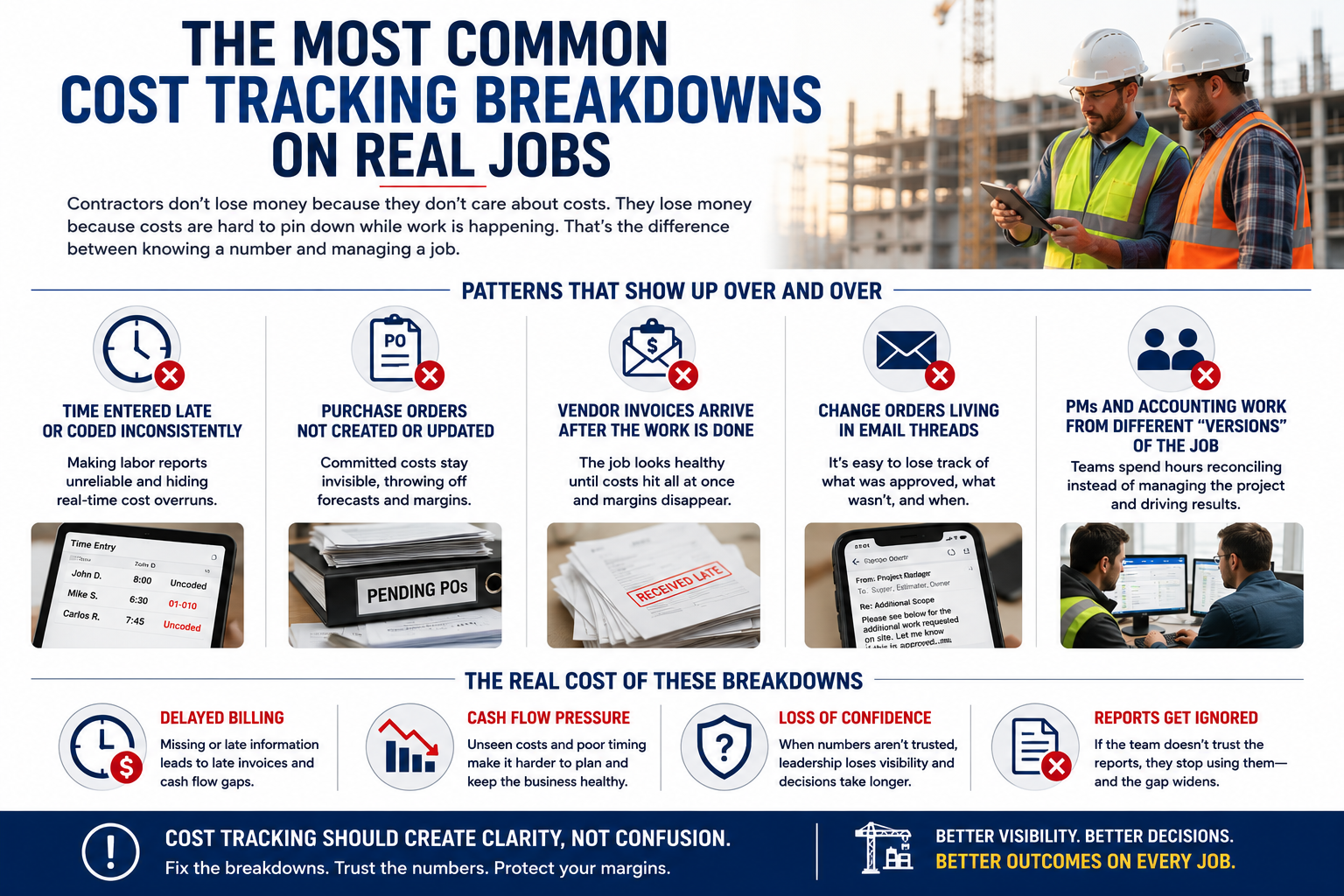
Contractors don't lose money because they don't care about costs. They lose money because costs are hard to pin down while work is happening. That's the difference between knowing a number and managing a job.
A few patterns show up over and over:
- Time is entered late or coded inconsistently, making labor reports unreliable.
- Purchase orders don't get created or updated, so committed costs are invisible.
- Vendor invoices arrive after the work is done, and the job looks healthy until it suddenly doesn't.
- Change orders get tracked in email threads, then someone forgets what was approved and what wasn't.
- PMs and accounting work from different "versions" of the job, then spend hours reconciling instead of managing.
Those breakdowns have consequences beyond a single project. They affect billing timing, cash flow planning, and leadership's confidence in the numbers. If the team doesn't trust the reports, they stop using them, and the gap widens.
The Job Cost Signals You Should Be Watching Every Week
A weekly job review is where margin protection actually happens. Waiting until the end of the month is too late for most corrective action, especially on labor-driven work where a few bad weeks can wipe out a quarter.
A strong weekly review doesn't need to be complicated. It needs to be consistent and built around metrics that lead to decisions.
Start with these:
- Budget Vs. Actual By Cost Code. You're looking for drift, not perfection. If one code is burning hot, you need a reason and a plan.
- Committed Costs. This is your exposure. If you've obligated spend, it belongs in the forecast even if the invoice hasn't arrived.
- Cost To Complete. This is the honest projection of what's left, informed by actuals and remaining commitments.
- Change Order Impact. Any scope shift that isn't priced, approved, and reflected in the budget is a margin leak.
- Labor Productivity Signals. Even simple checks help, such as comparing labor spend to percent complete for major phases.
These numbers become powerful when the team agrees they're real. That agreement comes from consistent coding, clean approvals, and a system that ties everything back to the same job structure.
Features That Separate "Nice To Have" From "We Can Run The Business On This"
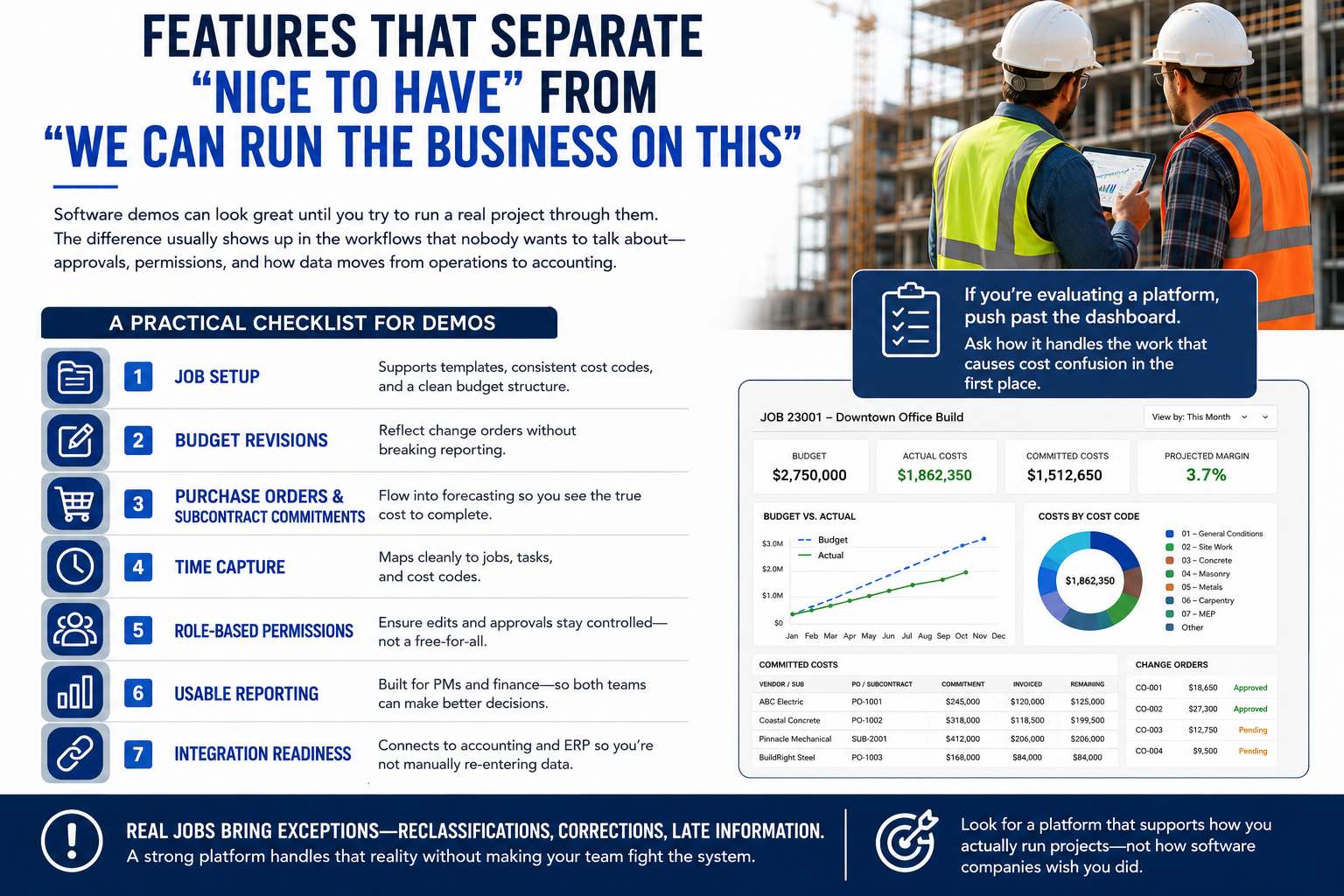
Software demos can look great until you try to run a real project through them. The difference usually shows up in the workflows that nobody wants to talk about, like approvals, permissions, and how data moves from operations to accounting.
If you're evaluating a platform, push past the dashboard. Ask how it handles the work that causes cost confusion in the first place.
Here's a practical checklist for demos:
- Job setup that supports templates, consistent cost codes, and a clean budget structure.
- Budget revisions that reflect change orders without breaking reporting.
- Purchase orders and subcontract commitments that flow into forecasting.
- Time capture that maps cleanly to jobs, tasks, and cost codes.
- Role-based permissions so edits and approvals don't turn into a free-for-all.
- Reporting that's usable for PMs and finance, not just one side of the house.
- Integration readiness for accounting and ERP, so you're not manually re-entering data.
Also, pay attention to how exceptions are handled. Real jobs include reclassifications, corrections, and late information. A platform needs to support that reality without making your team feel like they're fighting the system.
Cost Tracking And Billing Are Connected, Whether You Like It Or Not
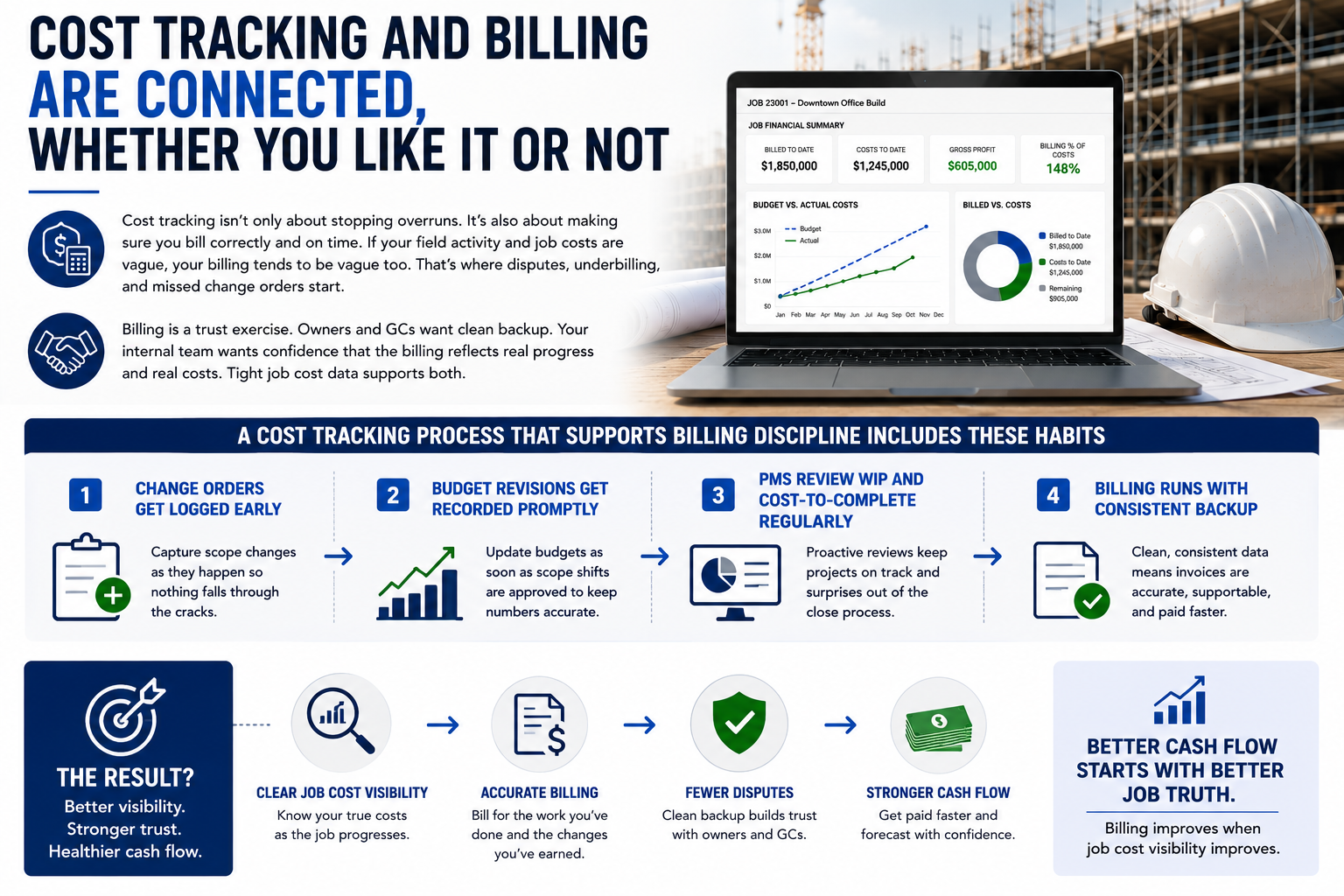
Cost tracking isn't only about stopping overruns. It's also about making sure you bill correctly and on time. If your field activity and job costs are vague, your billing tends to be vague too. That's where disputes, underbilling, and missed change orders start.
Billing is a trust exercise. Owners and GCs want clean backup. Your internal team wants confidence that the billing reflects real progress and real costs. Tight job cost data supports both.
A cost tracking process that supports billing discipline usually includes a few habits:
- Change orders get logged early, not at the end of the job.
- Budget revisions get recorded as soon as scope shifts are approved.
- PMs review WIP and cost-to-complete regularly, not only during close.
- Billing runs with consistent backup because the underlying data is consistent.
If you want better cash flow, start with a better job truth. Billing improves when job cost visibility improves.
Where BlueCollar.cloud Fits In The Real World
BlueCollar is built around the idea that construction finance and construction operations shouldn't live in separate universes. The gap between the field and accounting is where job cost drift grows, and it's where time gets wasted arguing about whose numbers are "right."
That's why our content keeps coming back to job costing, billing, cash flow, and the operational workflows that feed them. Contractors don't need another tool that creates more reconciliation work. They need systems that reduce the gaps.
Our goal is simple to describe and hard to achieve without the right structure: keep job cost data consistent, connected, and visible enough that project teams can act before the margin is gone. That means the system needs to support the way contractors actually run work, not the way software companies wish jobs worked.
Why NetSuite Keeps Showing Up In Job Cost Conversations
As contractors grow, complexity shows up fast. More projects, more crews, more divisions, more reporting requirements, and more pressure on cash flow. At that point, disconnected tools become a liability because leadership needs consolidated visibility, and finance needs a clean close and reporting.
That's where NetSuite often comes up in the discussion. Not because contractors want "enterprise software" for its own sake, but because they need a platform that can handle multi-entity operations, approvals, reporting, and financial structure without duct tape.
A few other references that show how we think about NetSuite in construction are worth scanning:
- NetSuite For Construction: Changing The Game
- 5 Reasons Construction Companies Need NetSuite + BlueCollar
- Reducing Construction Costs With NetSuite ERP
The core theme across all of them is consistent: contractors need systems that can support real job execution, real accounting, and real visibility across the business.
A Rollout Plan That Doesn't Blow Up Your Week
A cost-tracking initiative fails when it becomes a massive "system change" that disrupts the job. The teams that win approach it like a field rollout: phased, practical, and focused on building habits that stick.
Start with structure before you chase reporting. If your cost codes are messy and your job templates are inconsistent, the software will simply surface messy data faster.
A clean rollout usually looks like this:
- Standardize cost codes and job setup templates first, with input from both PMs and accounting.
- Implement time-capture and coding rules so that labor data becomes trustworthy early on.
- Add purchasing and commitments next, so committed cost exposure becomes visible.
- Bring change order workflows into the same structure so budget revisions stay clean.
- Train weekly review habits around a small set of reports that drive decisions.
Keep the early success criteria realistic. In the first 30 to 60 days, you're not aiming for perfection. You're aiming for consistent adoption, consistent coding, and a shared understanding of job truth. Once the team trusts the numbers, the system starts paying for itself in fewer surprises and faster decisions.
What You Should Expect After You Get Cost Tracking Right
The biggest shift isn't that your jobs magically become easier. The shift is that problems show up early enough to manage. That changes the tone of your business.
PMs stop getting blindsided. Accounting stops chasing missing details. Leadership stops learning about margin erosion after the fact. You start making decisions with numbers you trust.
You'll also notice operational improvements that aren't obvious at first glance:
- Fewer rushed purchases, because committed costs and forecasts are visible.
- Cleaner project handoffs, because the job structure is standardized.
- Faster billing cycles, because backup and progress tracking are less chaotic.
- Better coaching for PMs, because performance can be reviewed consistently across jobs.
That's the real goal. Not more data, but more control.
Pressure-Test Your Current Workflow
If you're tired of finding job cost problems after the damage is done, let's talk through how you're tracking costs today. We'll walk through your job structure, reporting needs, and how your team handles time, purchasing, and change orders. From there, we can show you what a cleaner, connected cost picture can look like with BlueCollar.
Frequently Asked Questions About Construction Cost Tracking Software
Construction Cost Tracking Software Pricing?
Pricing depends on company size, workflow scope, and whether you're connecting purchasing, time, AP, and billing into one system. Some contractors need lightweight visibility, while others need deeper integration across operations and finance. A good vendor conversation starts with how you run your work and what you need to see each week. Ask how pricing changes as you add users, projects, and entities.
Best Construction Cost Tracking Software For Small Contractors?
The best fit for a smaller contractor is the one your team will actually use every week. Look for a simpler job setup, clean time capture, and reporting that doesn't require after-the-fact spreadsheet cleanup. Smaller teams often feel cost drift more quickly because a few mistakes can quickly swing the margin. The right platform helps you run tighter jobs without adding admin chaos.
What Should Construction Cost Tracking Software Track On Every Job?
At a minimum, you should be able to track budget vs. actual by cost code, committed costs, and cost-to-complete. You also need labor, materials, equipment, subcontractor spend, and change orders tied to the same job structure. If any of those live outside the system, your forecast will drift, and your reporting will become a debate. Strong tracking keeps the job story consistent from field activity to the financial close.
Is Construction Cost Tracking Software The Same As Job Costing?
They're closely related, but they aren't always identical in practice. Job costing is the accounting outcome, while cost tracking is the ongoing process that feeds job costing with accurate data during the job. Contractors usually need both to protect their margin: visibility during the job and clean financials at the end. A connected approach reduces surprises and reduces reconciliation work.
How Does Construction Cost Tracking Software Improve Cash Flow?
Cash flow improves when billing gets cleaner and faster. If you can see change orders, labor trends, and committed costs early, you can align billing with the actual job status rather than guessing. That reduces underbilling, missed extras, and late disputes. For a deeper read on how job costing, billing, and cash flow connect, see this related post.
What Integrations Matter Most For Accurate Job Costs?
Time tracking, purchasing, accounts payable, and billing are the core integration points that keep job cost data honest. If those areas don't connect, you're stuck re-entering data and reconciling mismatched numbers. For contractors running NetSuite, integration can create a clearer path between operations and finance.
How Do I Set Up Cost Codes For Better Cost Tracking?
Start with a cost code structure that matches how you estimate, build, and manage the job. Keep it consistent across projects so leadership can compare performance across jobs and crews without having to translate code structures every time. Avoid over-building the structure at the start, since too many codes can lead to miscoding and messy reporting. A good structure is one that the field and the office can both follow without friction.
How Long Does It Take To Implement Construction Cost Tracking Software?
Implementation time depends on how complex your jobs are, how many systems you're connecting, and how clean your cost code structure is today. A phased rollout tends to work best, starting with job setup and time capture, then expanding into purchasing, AP, and forecasting. The goal early on is consistent adoption and trustworthy data, not a perfect system on day one. Teams that build a weekly review habit see results faster because the software becomes part of the rhythm.
Can NetSuite Help With Construction Job Costing And Reporting?
Yes, especially for contractors who need stronger financial structure, multi-entity reporting, and cleaner controls. NetSuite can support job costing, approvals, and reporting in ways that reduce manual work and improve visibility across the business. The key is to set it up with construction workflows in mind so that operations and accounting stay aligned.