Construction ERP Solutions: How Contractors Build Better Control Across Projects, Costs, And Operations
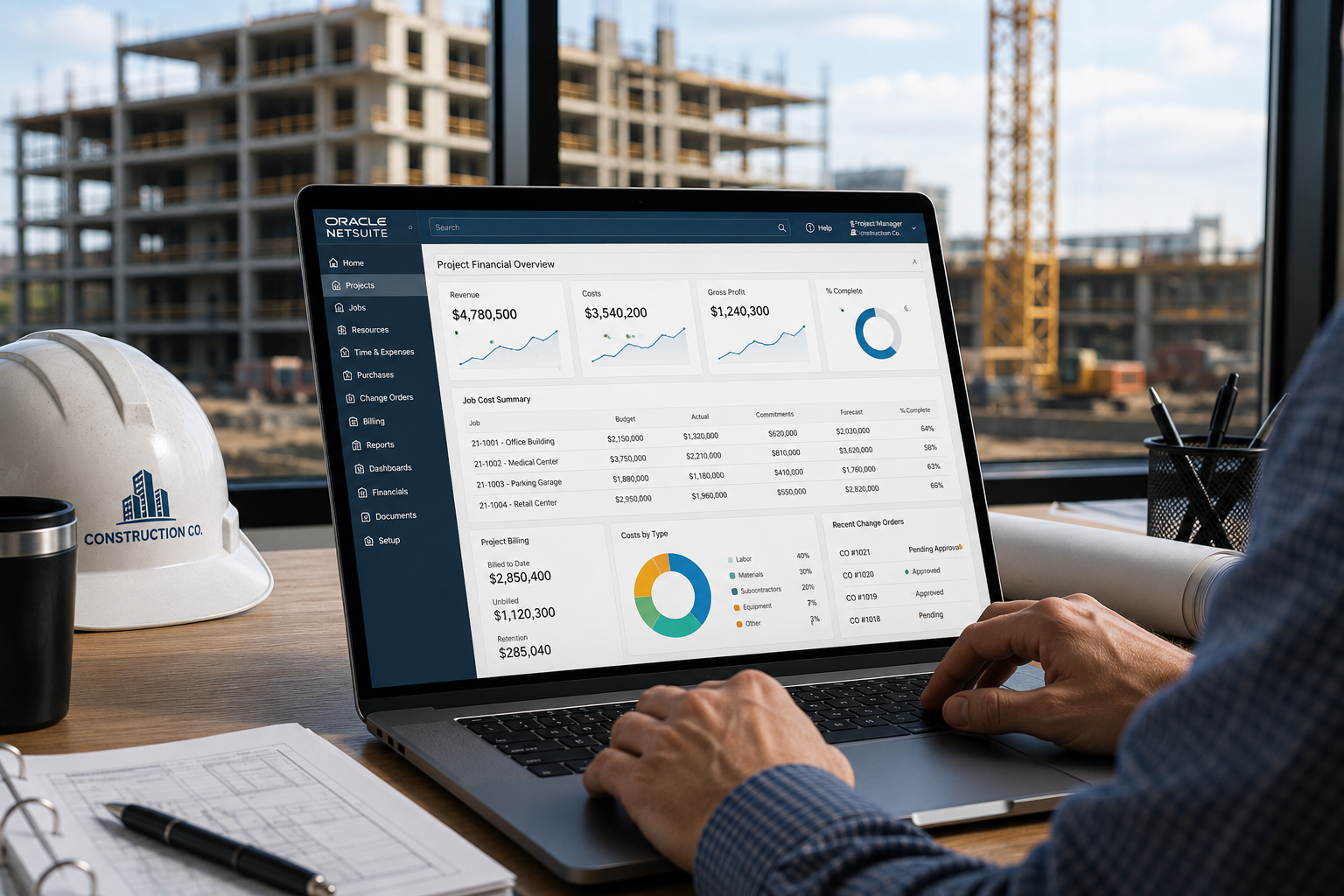
Contractors usually do not start looking for new software because everything is calm. They start looking because the business has outgrown the tools that once worked. Accounting is in one system, project updates live somewhere else, schedules are tracked separately, billing depends on manual follow-up, and leadership waits for someone to rebuild reports before they can see what is really happening.
That is where construction ERP solutions become important. A strong ERP foundation helps contractors bring accounting, job costing, billing, scheduling visibility, project management, cost tracking, and leadership reporting into a more connected environment. The goal is not to add another system to manage. The goal is to reduce the daily friction that keeps contractors from clearly seeing project health while work is still underway.
For construction companies, better control starts when the operational and financial sides of the business no longer operate from different versions of the truth.
Why Contractors Outgrow Disconnected Systems
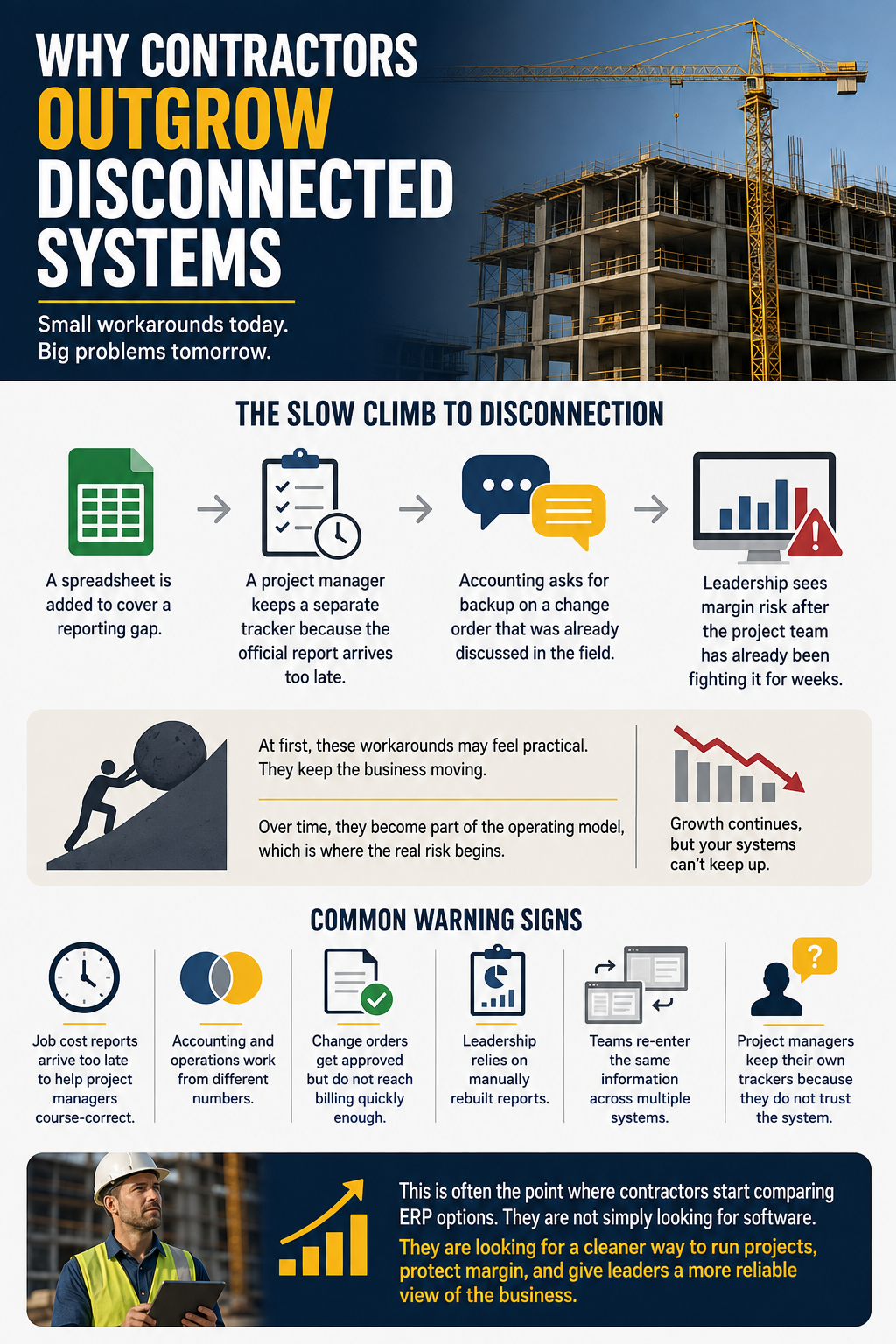
Most construction companies do not outgrow their systems overnight. The problems show up slowly. A spreadsheet gets added to cover a reporting gap. A project manager keeps a separate tracker because the official report arrives too late. Accounting is requesting backup for a change order that was already discussed in the field. Leadership sees margin risk after the project team has already been fighting it for weeks.
At first, these workarounds may feel practical. They keep the business moving. Over time, they become part of the operating model, which is where the real risk begins. The company may be growing, but the systems supporting that growth are still built around manual entry, disconnected updates, and delayed visibility.
Common warning signs include:
- Job cost reports arrive too late to help project managers course-correct.
- Accounting and operations work from different numbers.
- Change orders get approved but do not reach billing quickly enough.
- Leadership relies on manually rebuilt reports.
- Teams re-enter the same information across multiple systems.
- Project managers keep their own trackers because they do not trust the system.
This is often the point at which contractors start comparing the best construction ERP options. They are not simply looking for software. They are looking for a cleaner way to run projects, protect margin, and give leaders a more reliable view of the business.
What Construction ERP Solutions Should Actually Connect
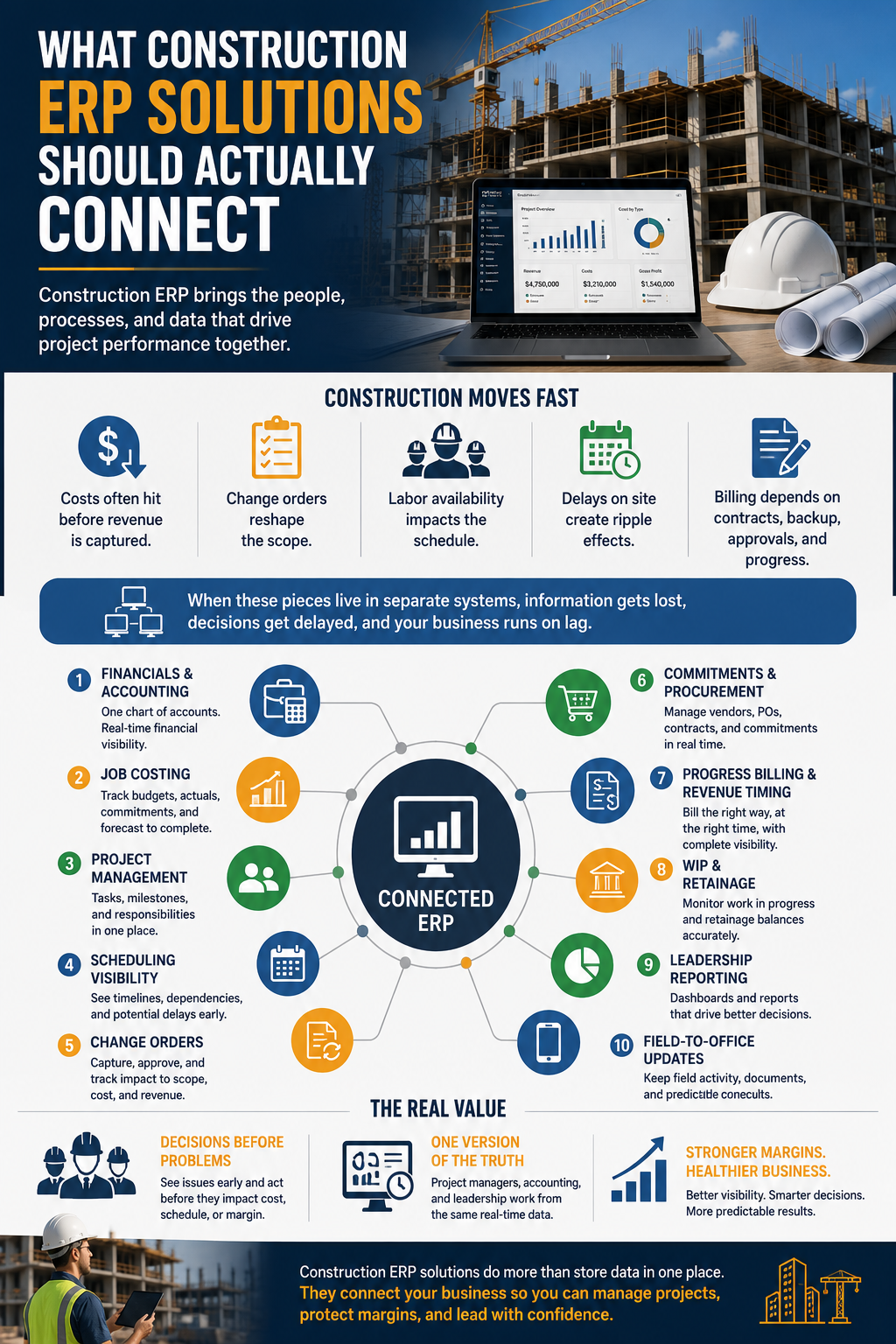
A construction ERP should connect the parts of the business that affect project performance. That means more than accounting. Contractors need financials, job costing, project management, scheduling visibility, procurement, commitments, change orders, billing, WIP, retainage, reporting, and field-to-office updates to work together.
Construction work moves quickly. Costs often hit before revenue is captured. Change orders reshape the scope. Labor availability affects the schedule. Billing depends on contract structure, backup, approvals, and progress. If these pieces live in separate systems, the company runs on lag.
A practical ERP environment should help connect:
- Financials and accounting.
- Job costing.
- Project management.
- Scheduling visibility.
- Change orders.
- Commitments and procurement.
- Progress billing and revenue timing.
- WIP and retainage.
- Leadership reporting.
- Field-to-office updates.
The value is not only that the data sits in one place. The value is that the data can support decisions before a problem becomes a month-end surprise. Project managers should not have to wait for accounting to rebuild a report. Accounting should not have to chase the field for every update. Leadership should not have to compare multiple spreadsheets to understand where the business stands.
Job Costing Should Sit At The Center
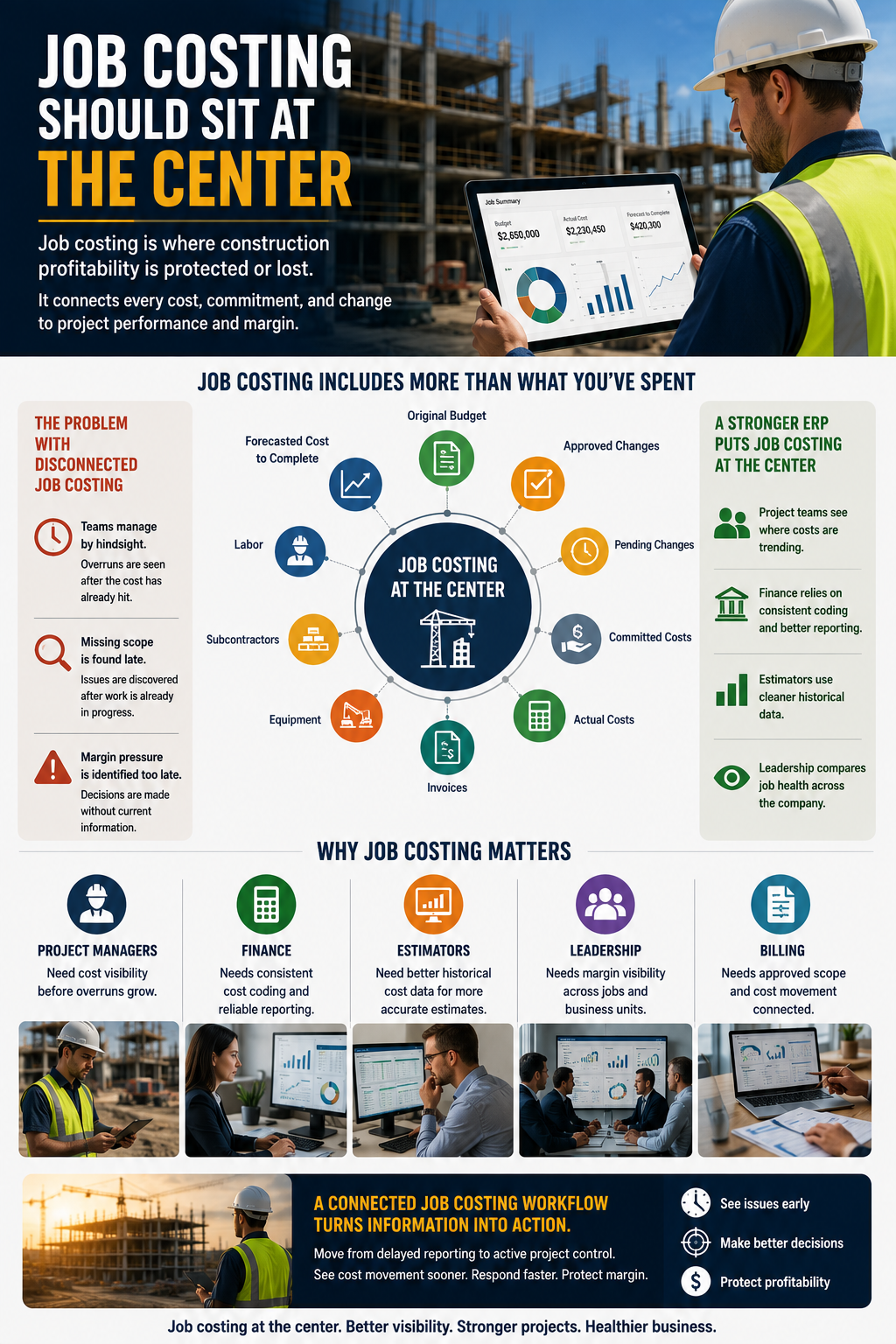
Job costing is where construction profitability is protected or lost. Contractors need to understand more than what has already been spent. They need to see the original budget, approved changes, pending changes, committed costs, actual costs, labor, materials, subcontractors, equipment, invoices, and forecasted cost to complete.
When job costing is disconnected, teams often manage by hindsight. They see the overrun after the cost has already hit. They find missing scope after the work has moved forward. They identify margin pressure after the project manager has already had to make decisions without current information.
A stronger ERP setup moves job costing closer to the center of the business. Project teams can see where costs are trending. Finance can rely on consistent coding and better reporting. Estimators can use cleaner historical data. Leadership can compare job health across the company without waiting on manual reporting.
Job costing is important because:
- Project managers need cost visibility before overruns grow.
- Finance needs consistent cost coding and reliable reporting.
- Estimators need better historical cost data.
- Leadership needs margin visibility across jobs.
- Billing needs approved scope and cost movement connected.
A connected NetSuite construction job costing workflow helps contractors move from delayed reporting to active project control. The sooner the right people can see cost movement, the sooner they can respond.
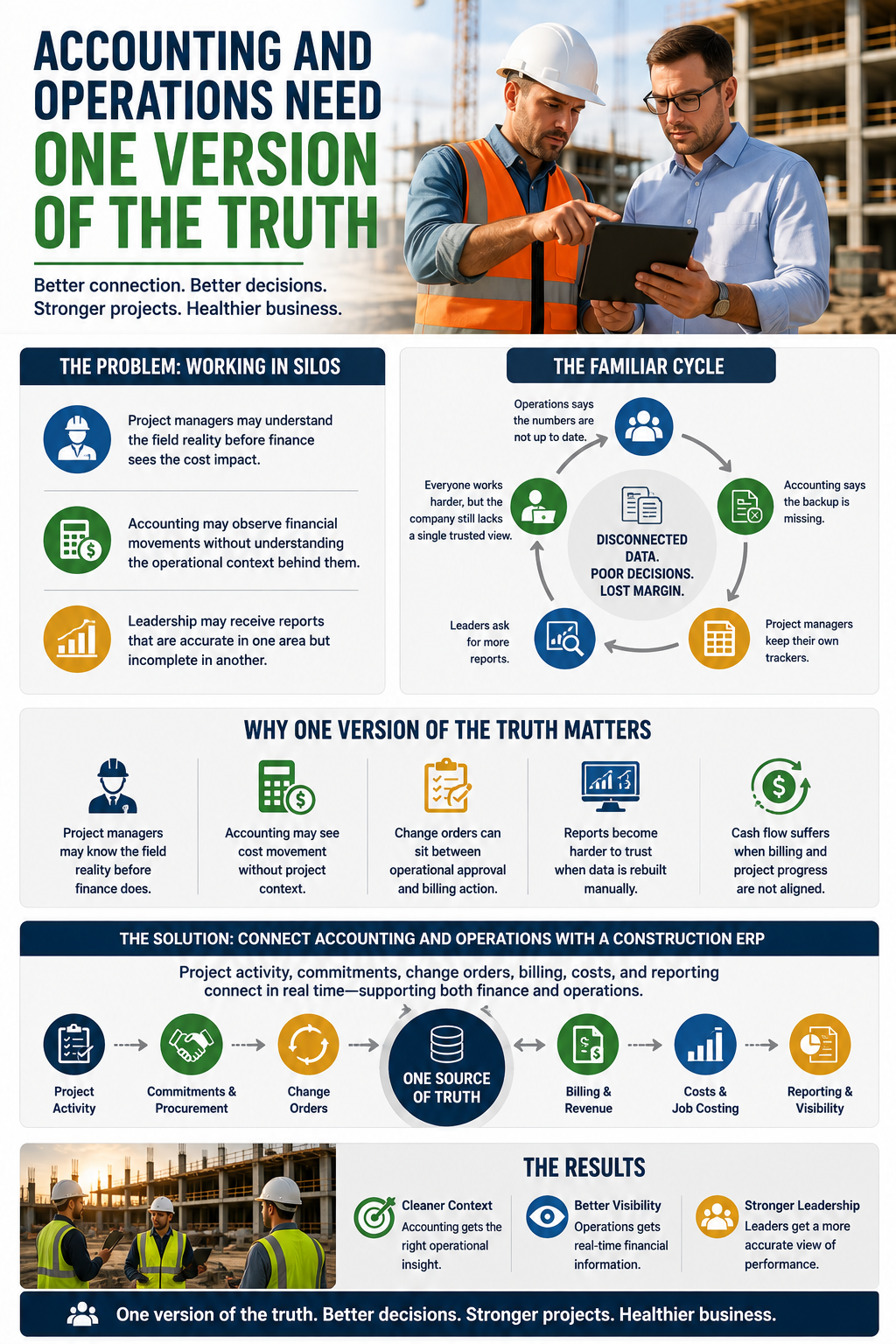
Accounting And Operations Need One Version Of The Truth
Construction companies run into trouble when accounting and operations operate like separate businesses. Project managers may understand the field reality before finance sees the cost impact. Accounting may observe financial movements without understanding the operational context behind them. Leadership may receive reports that are accurate in one area but incomplete in another.
The result is a familiar cycle. Operations says the numbers are not up to date. Accounting says the backup is missing. Project managers keep their own trackers. Leaders ask for more reports. Everyone works harder, but the company still lacks a single trusted view.
A construction ERP should reduce that gap. Project activity, commitments, change orders, billing, costs, and reporting need to connect in a way that supports both finance and operations.
This is very important because:
- Project managers may know the field reality before finance does.
- Accounting may see cost movement without project context.
- Change orders can sit between operational approval and billing action.
- Reports become harder to trust when data is rebuilt manually.
- Cash flow suffers when billing and project progress are not aligned.
Better construction accounting and operations integration helps both sides work from the same source of truth. Accounting gets cleaner context. Operations get better financial visibility. Leadership gets a more accurate view of performance.
Scheduling Visibility Should Not Sit Outside The ERP Conversation
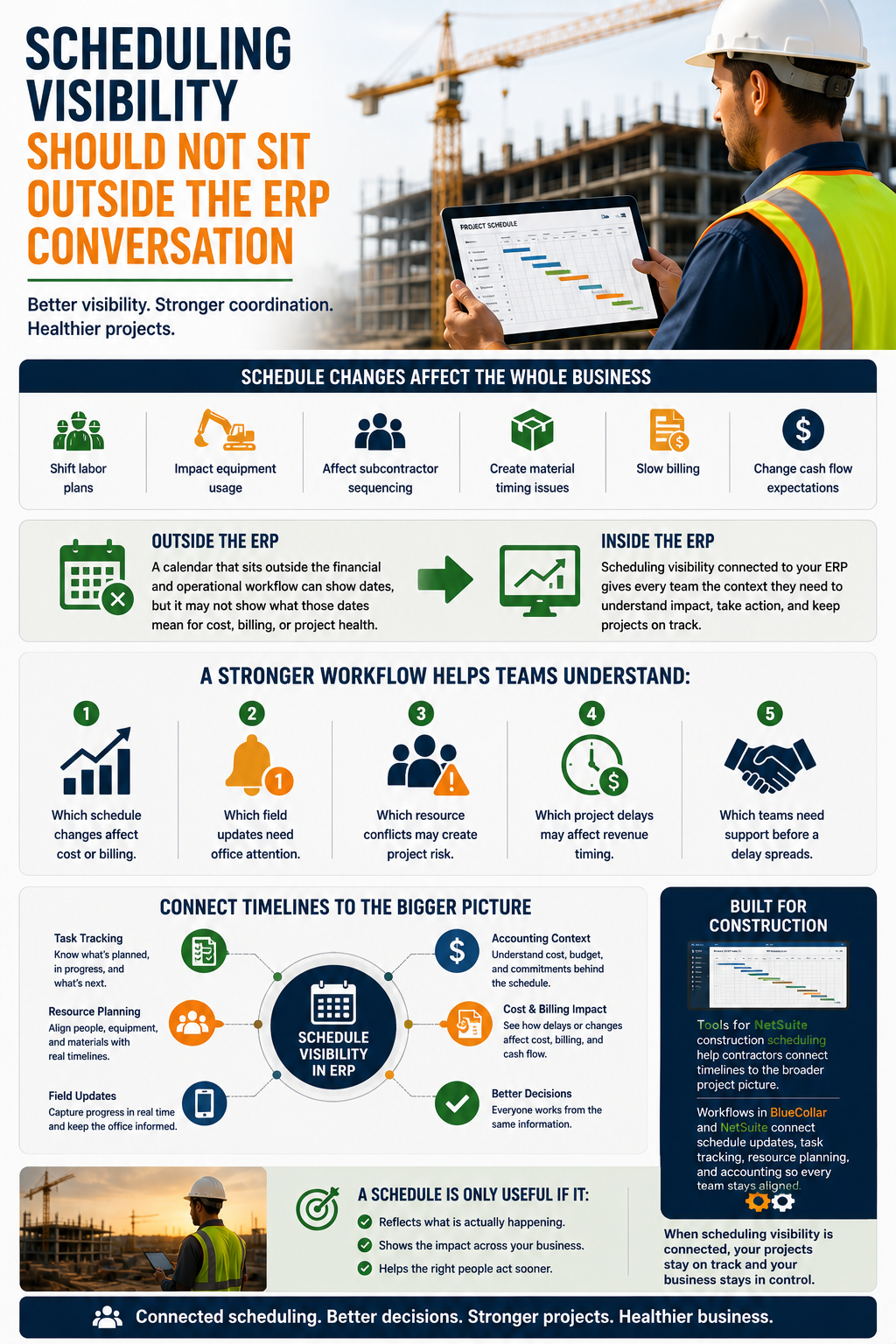
Scheduling is often treated like a project management issue, but schedule changes affect the whole business. A delay can shift labor plans, impact equipment usage, affect subcontractor sequencing, create material timing issues, slow billing, and change cash flow expectations.
That is why scheduling visibility should be part of the ERP conversation. A calendar that sits outside the financial and operational workflow can show dates, but it may not show what those dates mean for cost, billing, or project health.
A stronger workflow should help teams understand:
- Which schedule changes affect cost or billing.
- Which field updates need office attention.
- Which resource conflicts may create project risk.
- Which project delays may affect revenue timing.
- Which teams need support before a delay spreads.
Tools for NetSuite construction scheduling can help contractors connect timelines to the broader project picture. The same is true for workflows focused on managing project schedules in BlueCollar and NetSuite, where schedule updates, task tracking, resource planning, and accounting context must support one another.
A schedule is only useful if it reflects what is actually happening and helps the business act sooner.
Billing, Revenue, And Cash Flow Need Cleaner Workflows
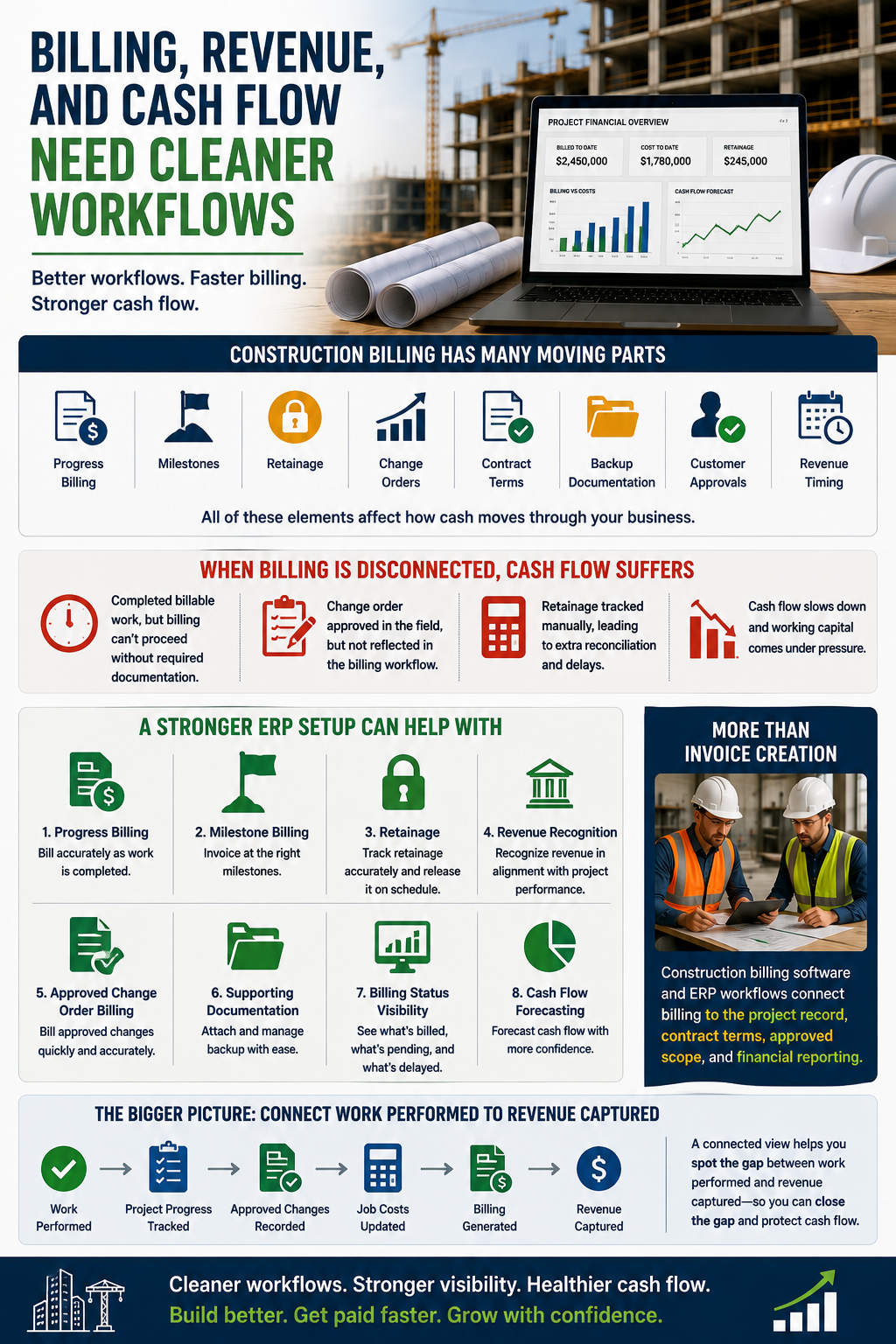
Construction billing has too many moving parts to depend on disconnected updates. Progress billing, milestones, retainage, change orders, contract terms, backup documentation, customer approvals, and revenue timing all affect how cash moves through the business.
If billing is disconnected from project progress, approved changes, and job cost data, cash flow slows down. A project may have completed billable work, but billing cannot proceed because the required documentation is missing. A change order may be approved in the field, but not reflected in the billing workflow. Retainage may be tracked manually, which creates extra reconciliation later.
A stronger ERP setup can help with:
- Progress billing.
- Milestone billing.
- Retainage.
- Revenue recognition.
- Approved change order billing.
- Supporting documentation.
- Billing status visibility.
- Cash flow forecasting.
This is where construction billing software and ERP workflows overlap. Contractors need more than invoice creation. They need billing connected to the project record, contract terms, approved scope, and financial reporting.
A connected view of construction management, job costing, billing, and cash flow helps contractors spot the gap between work performed and revenue captured. That gap is where cash flow pressure often begins.
Change Orders Need To Move From Field Discussion To Financial Impact
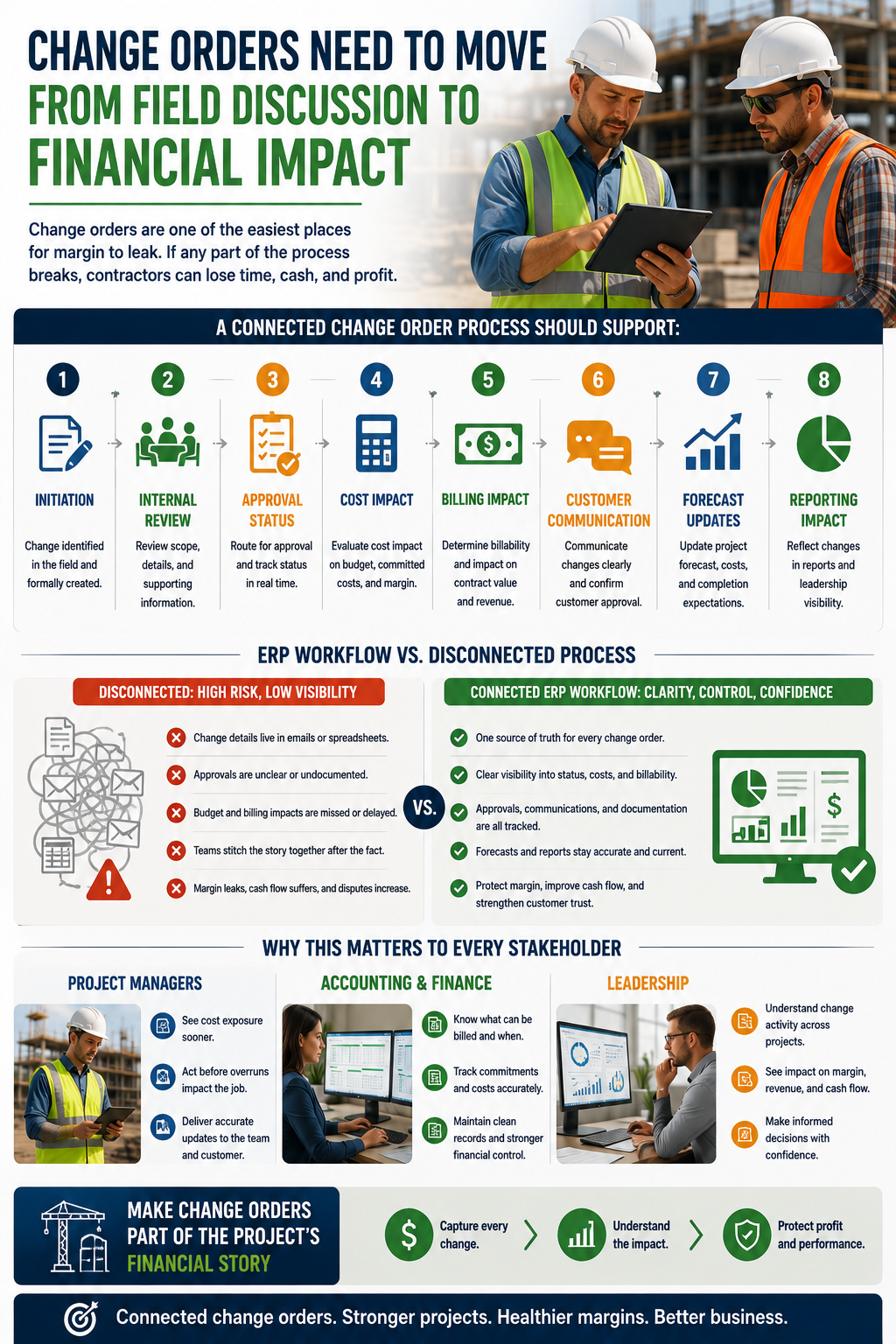
Change orders are one of the easiest places for margin to leak. The work may begin as a field conversation, but it needs to move through review, approval, budget impact, billing impact, and reporting. If any part of that chain breaks, contractors can lose time, cash, and profit.
A change order workflow should show more than whether a change exists. It should show where the change stands, what it affects, who approved it, whether it is billable, whether costs have been committed, and whether the forecast has been updated.
A connected process should support:
- Change order initiation.
- Internal review.
- Approval status.
- Cost impact.
- Billing impact.
- Customer communication.
- Forecast updates.
- Reporting impact.
When change orders live outside the ERP workflow, teams are forced to stitch the story together after the fact. That increases risk. Project managers need to understand cost exposure. Accounting needs to know what can be billed. Leadership needs to understand whether change activity is helping or hurting margin.
The best ERP workflows make change orders part of the project's financial story rather than a separate administrative task.
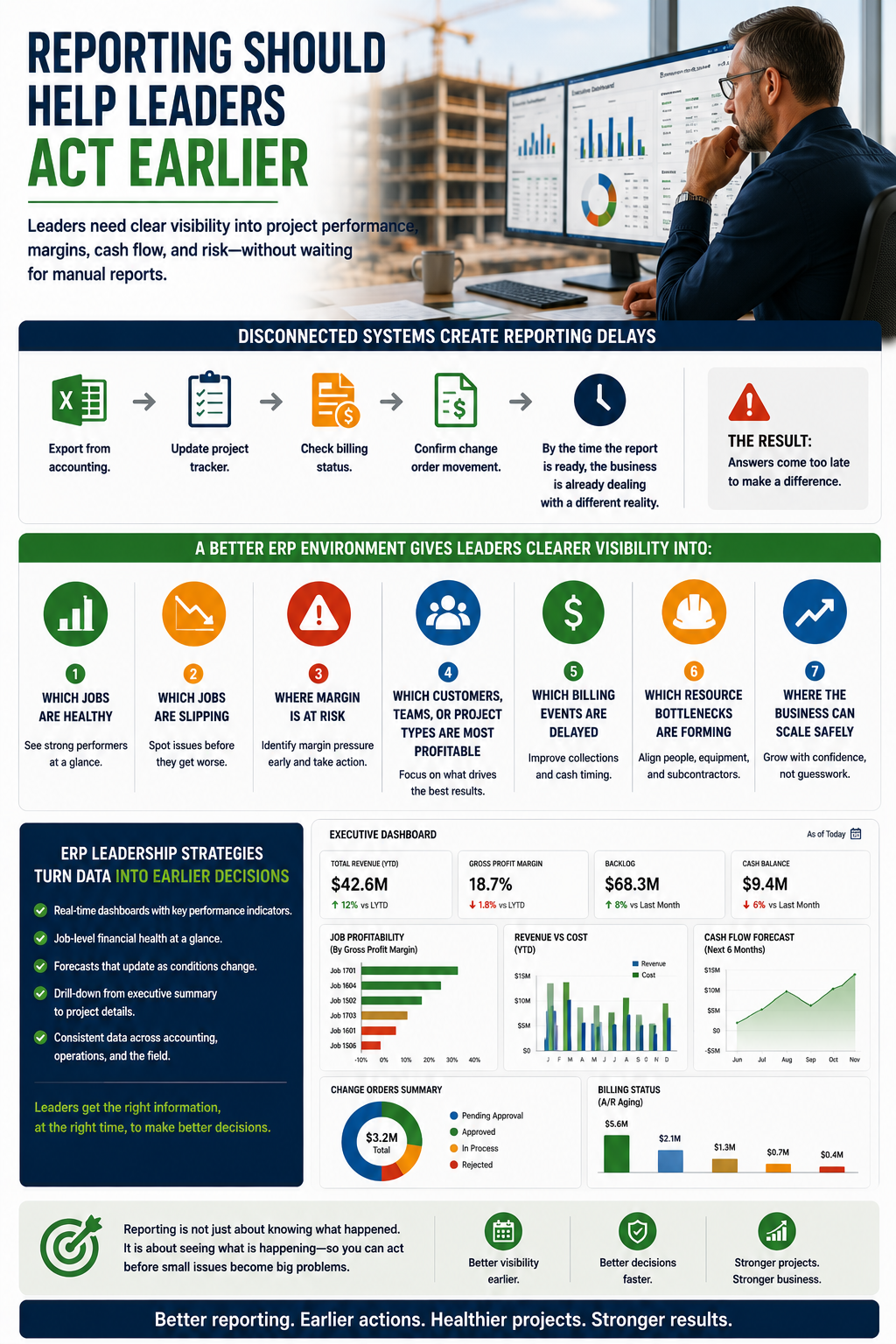
Reporting Should Help Leaders Act Earlier
Leadership reporting is one of the biggest reasons contractors move toward ERP. Executives need to know which jobs are healthy, which are slipping, where margins are at risk, which customers or project types are profitable, and where cash flow may tighten. They should not need a week of spreadsheet cleanup to answer those questions.
Disconnected systems create reporting delays because every answer has to be assembled manually. Someone exports from accounting. Someone updates the project tracker. Someone checks billing status. Someone confirms the change order movement. By the time the report is ready, the business may already be dealing with a different reality.
A better ERP environment gives leaders clearer visibility into:
- Which jobs are healthy?
- Which jobs are slipping?
- Where is the margin at risk?
- Which customers, teams, or project types are most profitable?
- Which billing events are delayed?
- Which resource bottlenecks are forming?
- Where can the business scale safely?
Strong NetSuite ERP leadership strategies for construction focus on turning project and financial data into earlier decisions. Leaders need reporting that helps them act, not reporting that simply explains what already went wrong.
Scaling Contractors Need Systems That Grow With Them
A construction ERP should not only solve today’s pain. It should support the company as the business becomes more complex. More projects, users, divisions, entities, approvals, cost codes, billing requirements, and reporting needs will put pressure on a system that was built for a smaller version of the company.
This is why contractors should think beyond the immediate problem. A company may begin by needing better job costing, but growth may also require multi-entity visibility, stronger permissions, more detailed reporting, better billing controls, and cleaner project workflows.
Scaling contractors often need support for:
- Multi-entity operations.
- Multi-project visibility.
- More complex approvals.
- More detailed cost codes.
- More users and permissions.
- Stronger reporting needs.
- Larger billing volume.
- More field-to-office coordination.
Content focused on NetSuite construction scaling and growth speaks directly to this issue. So does the point where companies reach the QuickBooks breaking point. A system that worked at one size may not be enough once the company needs stronger controls, better reporting, and more reliable operational visibility.
NetSuite, BlueCollar, And Construction ERP Solutions
NetSuite can provide a strong ERP backbone for construction companies, especially when the system is configured around how contractors actually operate. It can support financials, reporting, approvals, users, entities, roles, and core business processes. For construction, the ERP foundation becomes more valuable when paired with workflows that understand job costing, project management, billing, WIP, scheduling visibility, and field-to-finance coordination.
That is where BlueCollar fits. BlueCollar adds construction-specific functionality and workflow design to help contractors use NetSuite in ways that match project-based work. The goal is to make NetSuite more useful for the daily realities of construction operations, not just general accounting.
Together, NetSuite and BlueCollar can support:
- NetSuite as the ERP backbone.
- BlueCollar as the construction layer.
- Job costing and project controls.
- Billing and WIP visibility.
- Project management workflows.
- Scheduling and resource visibility.
- Reporting for construction leadership.
- Field-to-finance connection.
Contractors evaluating NetSuite for construction companies should consider both the platform and the construction workflows built around it. The same is true for teams reviewing NetSuite for construction or exploring construction accounting and project management in NetSuite with BlueCollar Projects.
ERP value depends on workflow fit. The system has to match how the contractor estimates, builds, bills, reports, and grows.
What Contractors Should Ask Before Choosing Construction ERP
Choosing ERP should be a workflow decision, not only a technology decision. A demo can look polished, but the real question is whether the system can support the way the company manages projects, costs, billing, changes, schedules, reporting, and growth.
Contractors should ask practical questions before choosing a system:
- Can the system support job costing at the level we need?
- Can project managers and accounting work from the same data?
- Can field teams update information without creating more admin work?
- Can change orders connect to budget, billing, and reporting?
- Can schedules connect to labor, materials, dependencies, and project status?
- Can billing support progress billing, retainage, milestones, and contract changes?
- Can leadership see job health without manual spreadsheet work?
- Can the system scale with more projects, entities, users, and reporting needs?
- Can implementation be designed around how our team actually works?
The best ERP choice is the one that reduces friction across the business. A system that only helps accounting may leave project teams disconnected. A system that only helps project managers may leave finance rebuilding the truth later. Contractors need a connected operating model that supports both.
Build A More Connected Construction Business With BlueCollar
If your team is spending too much time reconciling spreadsheets, chasing project data, or questioning whether the numbers are current, it may be time to rethink the operating system behind the business.
BlueCollar helps contractors turn NetSuite into a connected construction ERP foundation for job costing, billing, scheduling visibility, project management, cost tracking, and leadership reporting.
Book a demo to see how BlueCollar supports construction ERP workflows.
Frequently Asked Questions About Construction ERP Solutions
What Are Construction ERP Solutions?
Construction ERP solutions are systems that help contractors connect financials, job costing, project management, billing, procurement, scheduling visibility, reporting, and operational workflows. The goal is to give project teams, accounting, and leadership a more consistent view of the business. Instead of relying on disconnected spreadsheets and separate tools, contractors can work in a single connected environment. This helps the company manage jobs, costs, billing, reporting, and growth with better control.
How Do Construction ERP Solutions Help Contractors?
Construction ERP solutions help contractors reduce disconnected workflows, improve job cost visibility, speed up reporting, connect accounting and operations, improve billing, and give leadership a clearer view of project health. They also help reduce duplicate entry because teams do not have to move the same information across multiple tools. A strong ERP setup can make change orders, costs, billing, and reporting easier to manage. The biggest benefit is that teams can make decisions based on more up-to-date and trusted data.
When Should A Contractor Consider Construction ERP?
A contractor should consider ERP when the business is relying too heavily on spreadsheets, job cost reports arrive too late, accounting and project teams do not trust the same numbers, billing is delayed, or leadership cannot see project health without manual reporting. Growth can also trigger the need for an ERP system, especially when the company adds more projects, users, divisions, entities, or approval workflows. QuickBooks and standalone tools may work early on, but they often become limiting as complexity increases. The right time to evaluate ERP is before the current process becomes a major growth constraint.
What Features Should Construction ERP Include?
Construction ERP should include job costing, project accounting, change order tracking, scheduling visibility, procurement, commitments, billing, revenue management, dashboards, reporting, role permissions, and multi-entity support. It should also support the connection between project activity and financial impact. Contractors should look for workflows that help project managers, accounting teams, and leadership work from trusted information. Features only matter if they support how the contractor actually runs the work.
How Does ERP Improve Construction Job Costing?
ERP improves construction job costing by bringing labor, materials, subcontractors, equipment, commitments, invoices, and change events into a more connected environment. This makes it easier to compare estimated costs against actual costs while the project is still active. Project managers can see cost movement sooner, finance can rely on cleaner cost coding, and leadership can monitor margin risk across jobs. Better job costing helps contractors move from after-the-fact reporting to active project control.
Can ERP Help With Construction Billing And Cash Flow?
Yes. ERP can help with construction billing and cash flow by connecting project progress, approved change orders, contract terms, costs, retainage, milestones, and billing status. When billing depends on disconnected updates, invoices can be delayed, and cash flow can tighten. A connected ERP workflow helps teams see what is ready to bill, what backup is needed, and where revenue may be lagging behind completed work. This gives contractors better visibility into cash flow and billing performance.
Is NetSuite A Good ERP For Construction Companies?
NetSuite can be a strong ERP foundation for construction companies, especially when it is paired with construction-specific workflows. Contractors need more than general accounting. They need job costing, project controls, billing, WIP, change order tracking, scheduling visibility, and reporting that reflects the way construction work happens. BlueCollar helps add a construction layer around NetSuite, enabling contractors to use it as a more complete operating foundation.
How Should Contractors Choose The Right Construction ERP Solution?
Contractors should choose ERP by evaluating workflow fit, not just feature lists. They should look at job-costing depth, the connection between accounting and operations, billing support, scheduling visibility, reporting quality, scalability, and the implementation approach. The system should support project managers, accounting teams, field teams, and leadership without forcing everyone into disconnected side processes. The right solution should make the business easier to run as it grows.