Construction Cost Accounting Software: How Contractors Get Better Control Of Job Costs, Cash Flow, And Profit
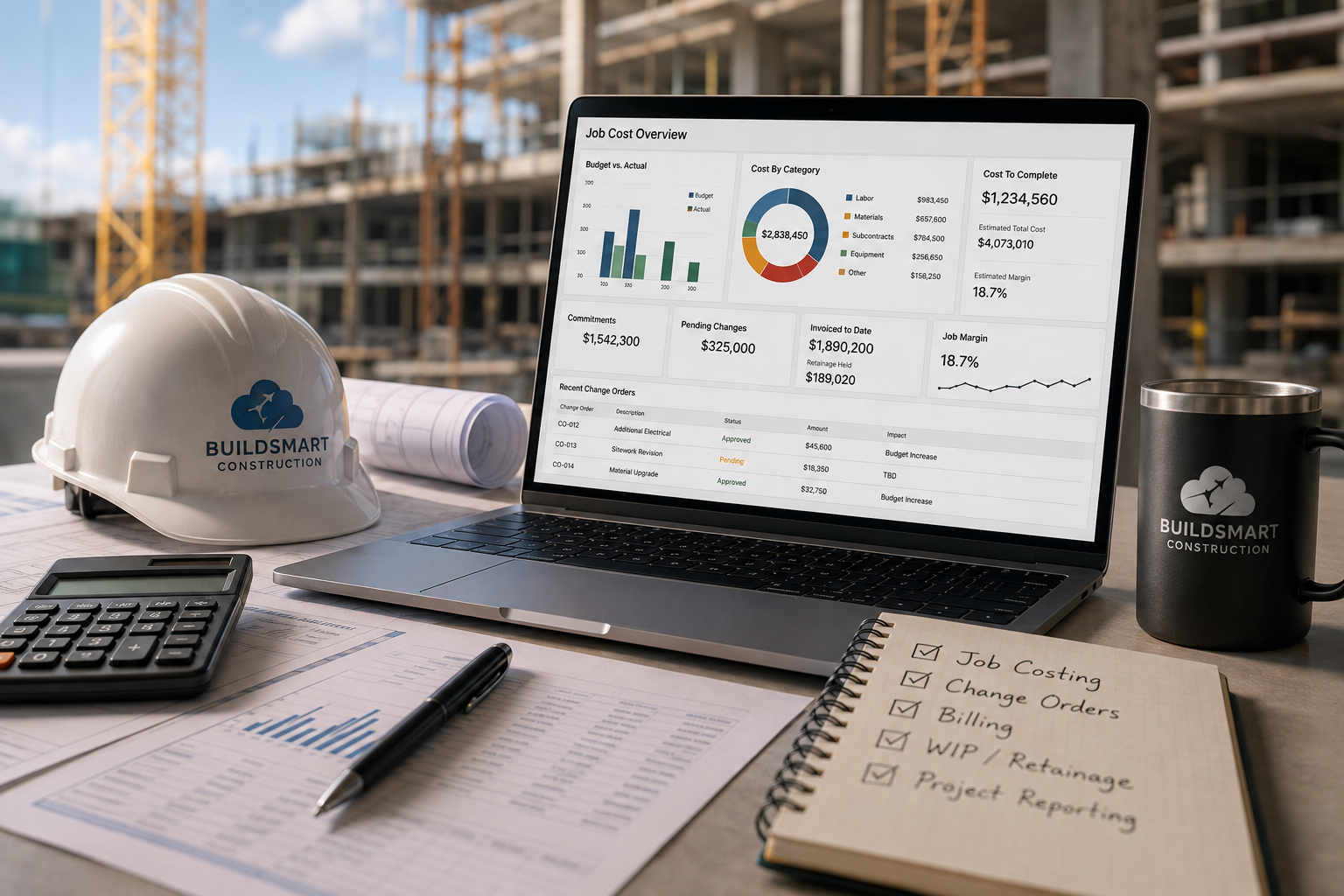
Construction companies rarely lose control of costs in one dramatic moment. The problems usually build slowly. A project manager waits too long for a job cost report. Accounting is chasing a missing backup on a change order. Billing is delayed because the project record is out of date. Leadership sees margin pressure after the team has already been fighting it for weeks.
That is where construction cost tracking software becomes more than an accounting upgrade. Contractors need a cleaner way to connect project activity, job costs, commitments, billing, retainage, WIP, reporting, and cash flow. They need to see what is happening while the job is still active, not after month-end reporting turns yesterday’s project problem into today’s financial surprise.
Strong construction accounting and operations integration gives contractors a more reliable operating foundation. Finance, operations, project managers, and leadership should not have to argue over which spreadsheet is up to date. They should be able to work from the same project financial picture.
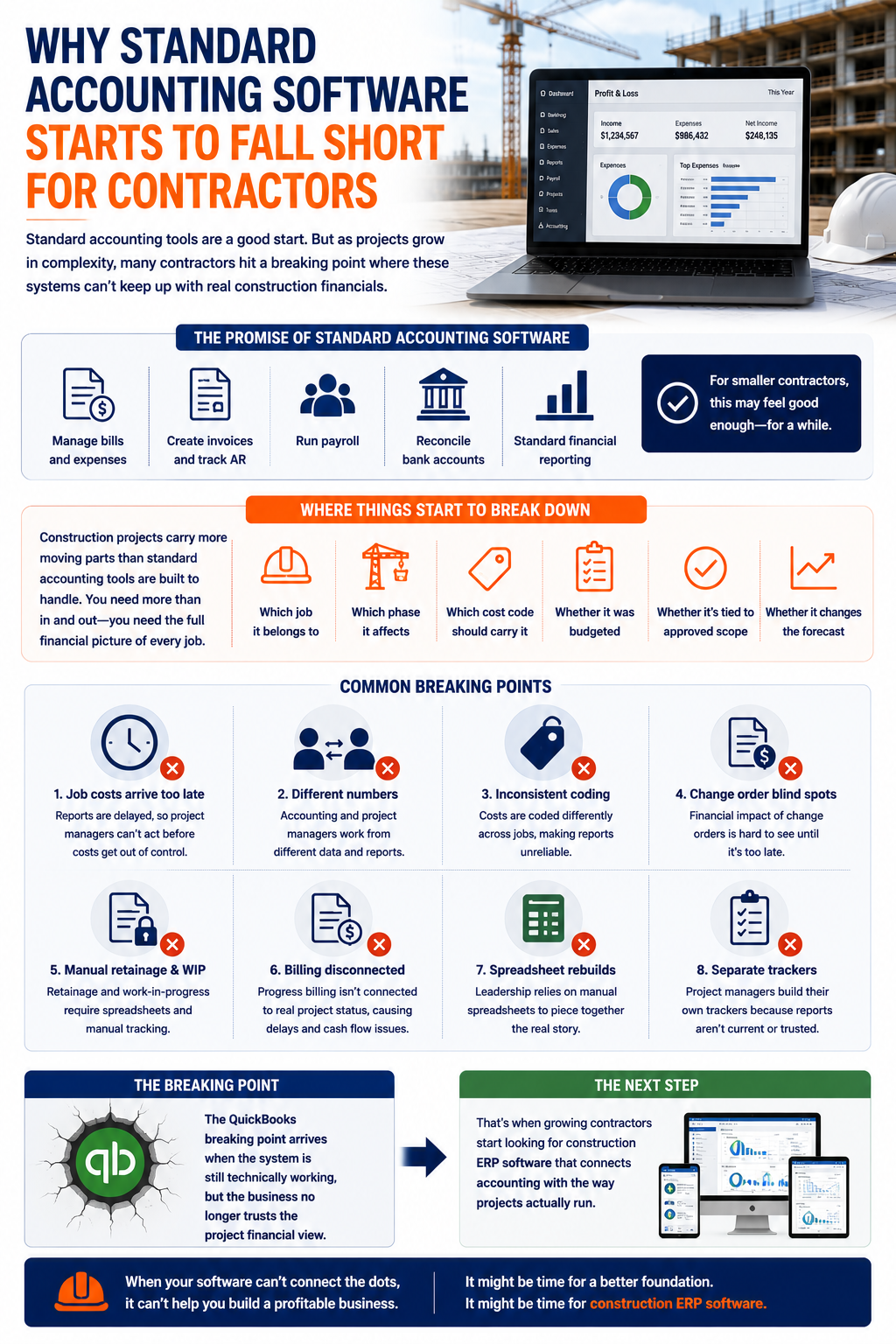
Why Standard Accounting Software Starts To Fall Short For Contractors
Many contractors start with general accounting tools because they are familiar, affordable, and simple enough for basic bookkeeping. Those systems can help manage bills, invoices, payroll, bank reconciliation, and standard financial reporting. For a smaller company, that may feel good enough for a while.
The trouble starts when project financials become more complex than the accounting system can comfortably support. Construction companies need to know not only whether money came in or went out. They need to know which job it belongs to, which phase it affects, which cost code should carry it, whether it was budgeted, whether it is tied to approved scope, and whether it changes the forecast.
Common breaking points include:
- Job costs arrive too late to guide project decisions.
- Accounting and project managers work from different numbers.
- Costs are coded inconsistently across jobs.
- The change order's financial impact is hard to see.
- Retainage and WIP require manual tracking.
- Progress billing is disconnected from project status.
- Leadership relies on spreadsheet rebuilds.
- Project managers keep separate trackers because the reports are not up to date.
For many growing contractors, the QuickBooks breaking point arrives when accounting is still technically working, but the business no longer trusts the project financial view. That is usually when teams start comparing construction ERP software that can connect accounting with the way projects actually run.
What Construction Cost Accounting Software Should Actually Do
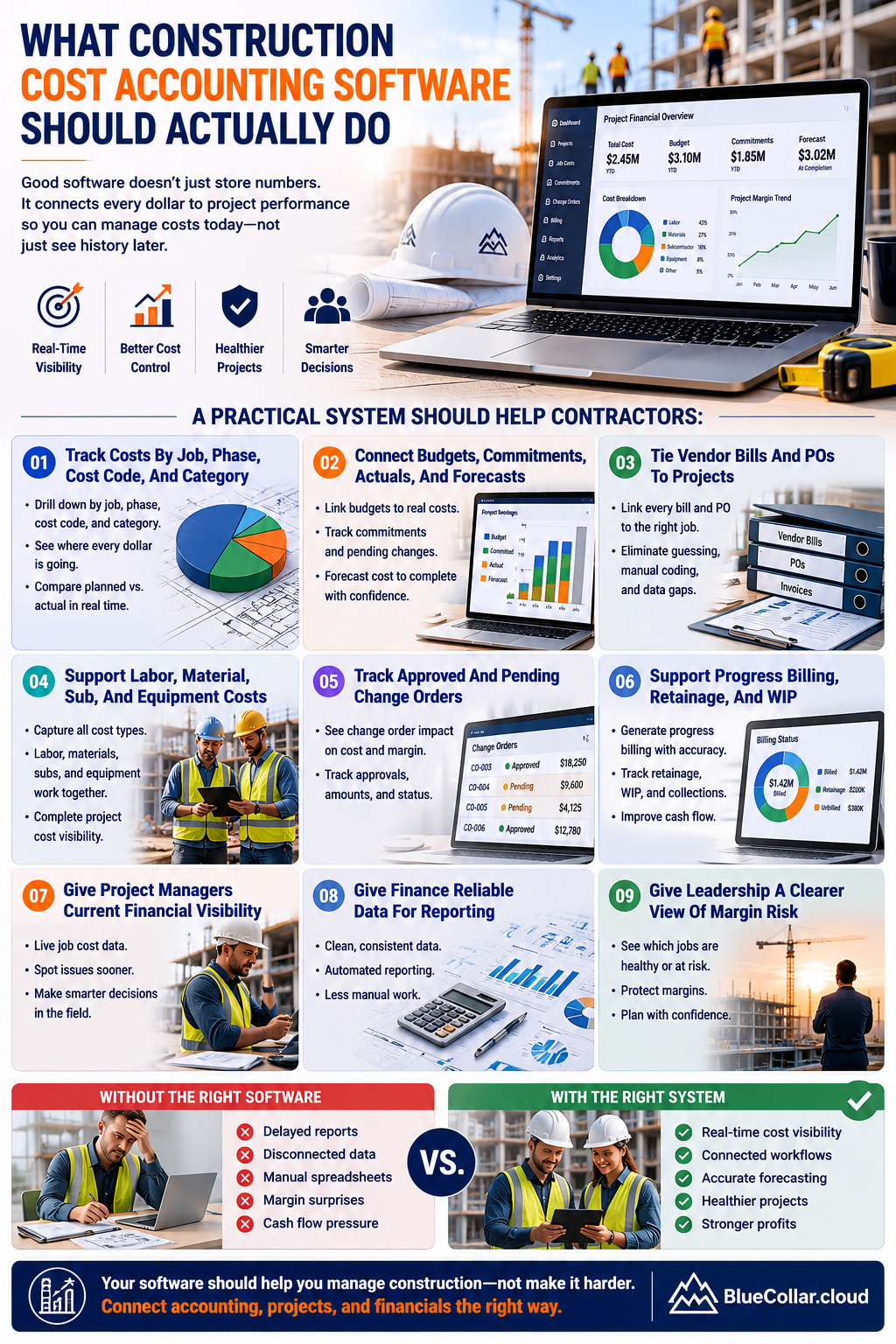
A construction company needs more than accounting software with job names attached. A strong system should connect financial activity to project performance. That means budgets, commitments, actuals, pending changes, approved changes, billing, retainage, WIP, reporting, and cash flow should all support the same operating picture.
Contractors need to track costs by job, phase, cost code, cost type, and category. They need vendor bills, purchase orders, subcontractor commitments, payroll costs, material costs, equipment costs, and invoices linked to the correct project. They also need sufficient visibility for project managers to act before a job goes off track.
A practical system should help contractors:
- Track costs by job, phase, cost code, and category.
- Connect budgets, commitments, actuals, and forecasts.
- Tie vendor bills and purchase orders to projects.
- Support labor, material, subcontractor, and equipment costs.
- Track approved and pending change orders.
- Support progress billing, retainage, and WIP.
- Give project managers current financial visibility.
- Give finance reliable data for reporting.
- Give leadership a clearer view of margin risk.
The right construction industry ERP software should help the business manage project finances as work progresses, not just summarize what happened after costs have already been incurred.
Job Costing Has To Sit At The Center
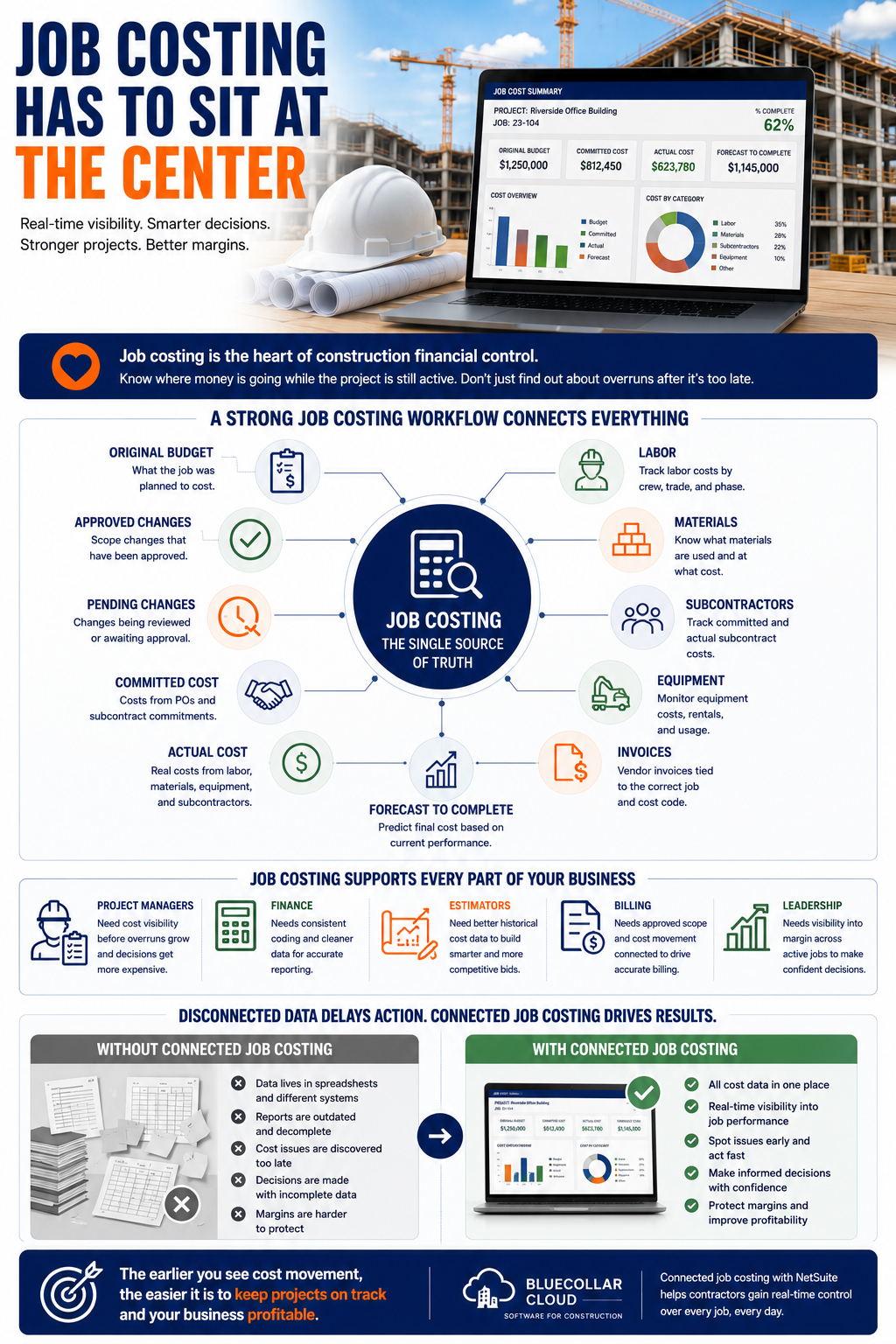
Job costing is the heart of construction financial control. Contractors need to know where money is going while the project is still active. A report that shows the overrun after the work is finished may be accurate, but it does not help the project manager protect the job in real time.
A strong job costing workflow should show the original budget, approved changes, pending changes, committed cost, actual cost, labor, materials, subcontractors, equipment, invoices, and forecast cost to complete. Those pieces should not sit in disconnected files. They should work together so that project teams, finance, and leadership can understand job health from a single source.
Job costing supports different parts of the business:
- Project managers need cost visibility before overruns grow.
- Finance needs consistent coding and cleaner reporting.
- Estimators need better historical cost data.
- Billing needs approved scope and cost movement connected.
- Leadership needs visibility into margin across active jobs.
A connected NetSuite construction job costing workflow helps contractors move away from delayed reporting and toward active project control. The earlier teams can see cost movement, the easier it is to decide what needs attention.
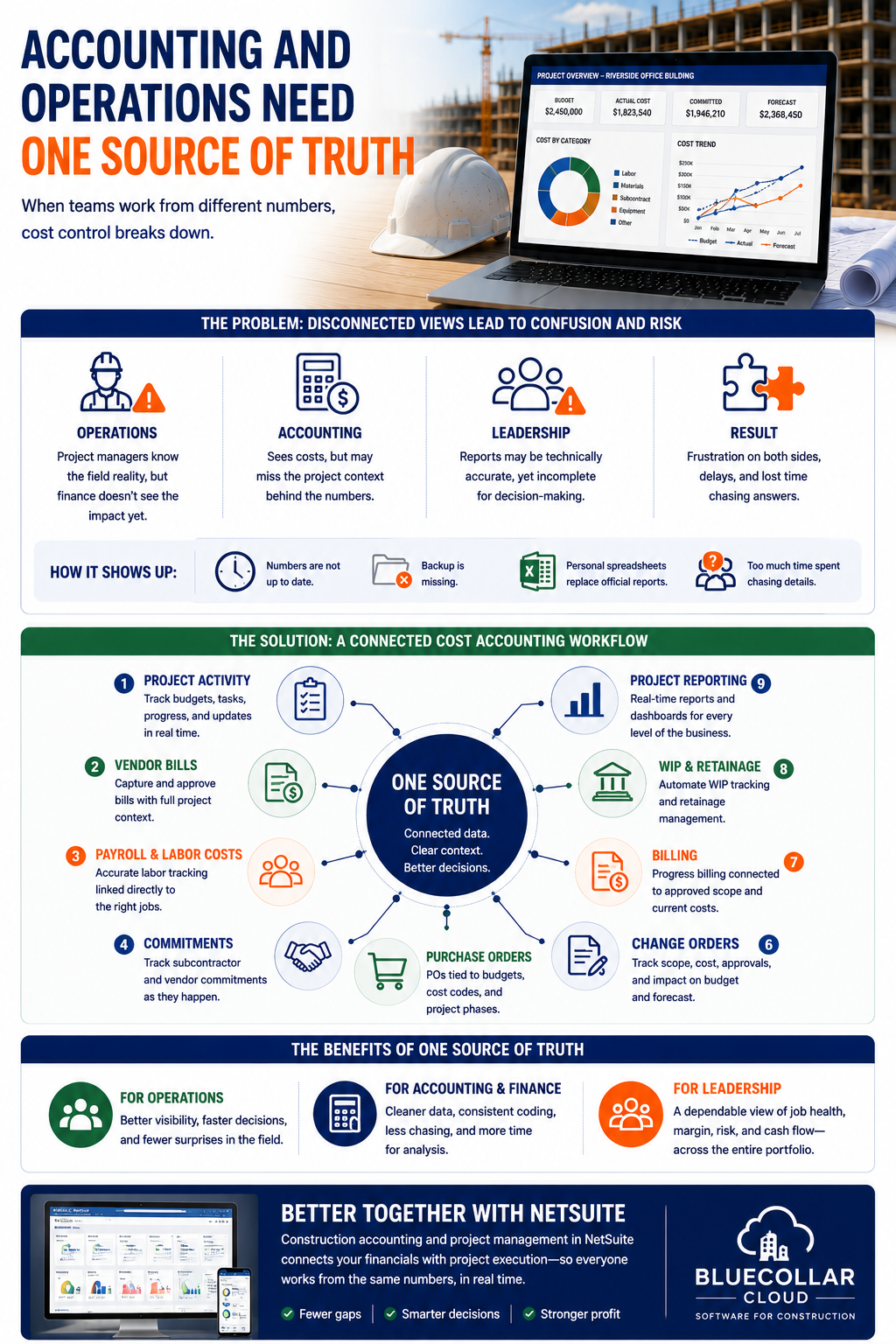
Accounting And Operations Need One Source Of Truth
Cost control breaks down when accounting and operations operate from separate views. Project managers may know field reality before finance sees the financial impact. Accounting may see costs without understanding the project context behind them. Leadership may receive reports that are technically accurate yet incomplete.
This creates frustration on both sides. Operations may say the numbers are not up to date. Accounting may say the backup is missing. Project managers may keep personal trackers because they do not trust official reports. Finance may spend too much time chasing details that should have been captured closer to the project.
A stronger cost accounting workflow should connect:
- Project activity.
- Vendor bills.
- Payroll and labor costs.
- Commitments.
- Purchase orders.
- Change orders.
- Billing.
- WIP and retainage.
- Project reporting.
Better construction accounting and project management in NetSuite helps reduce that gap. Accounting gets cleaner project context, operations gets better financial visibility, and leadership gets a more dependable view of where each job stands.
Change Orders Need Clear Cost And Billing Impact
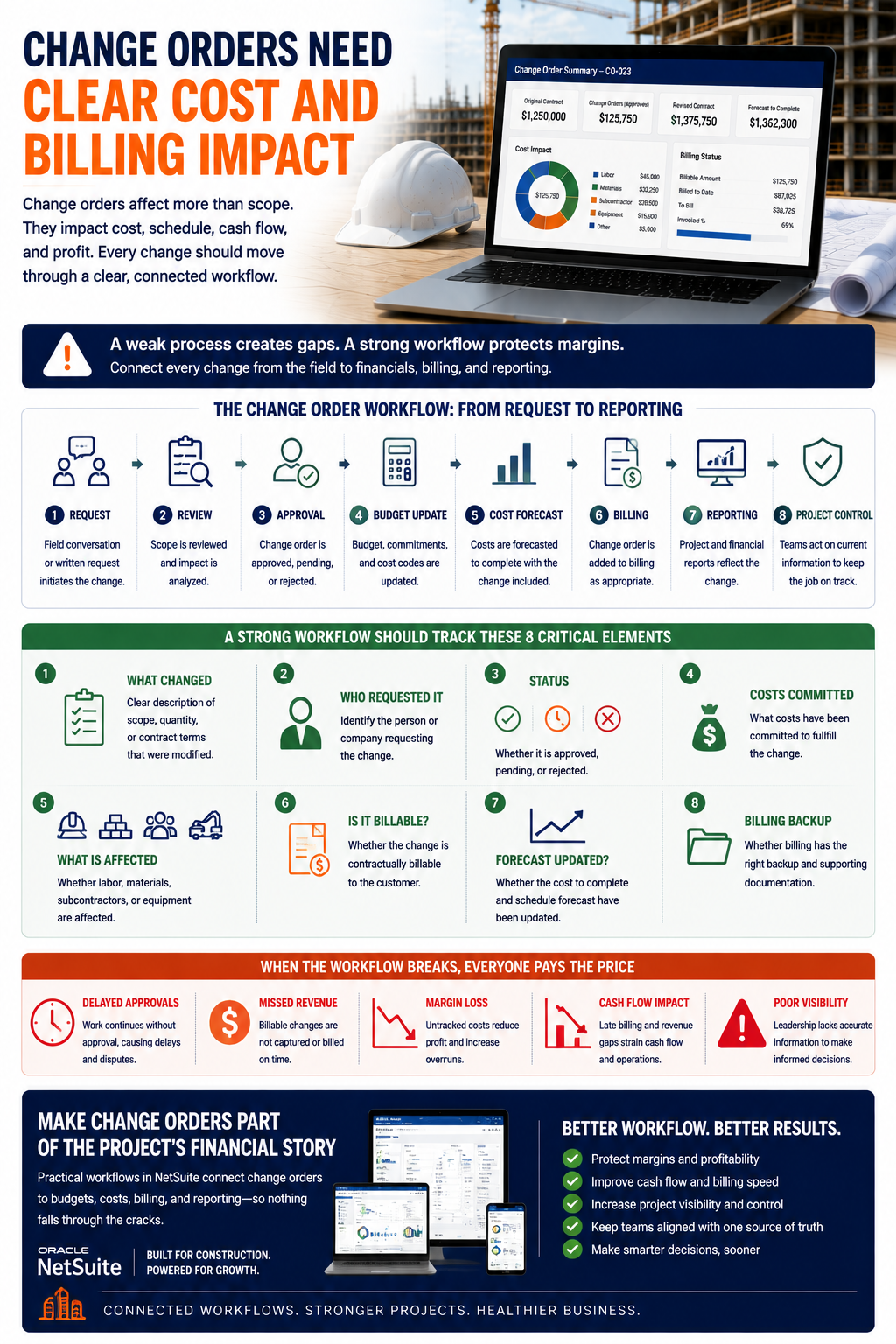
Change orders are one of the easiest places for margin to leak. The work may start as a field conversation, but the financial impact must go through review, approval, budget update, cost forecast, billing, and reporting. If any part of that chain breaks, the contractor can lose time, cash, and profit.
A change order workflow should show more than whether a change exists. It should show who requested it, whether it is approved, what costs are associated with it, whether it is billable, whether the forecast has changed, and whether billing has the appropriate backup.
A strong workflow should track:
- What changed.
- Who requested it.
- Whether it is approved, pending, or rejected.
- What costs have been committed.
- Whether labor, materials, subcontractors, or equipment are affected.
- Whether the change is billable.
- Whether the forecast has been updated.
- Whether billing has the right backup.
Practical workflows for using NetSuite for construction should make change orders part of the project’s financial story. They should not sit off to the side as a separate admin task for accounting to find later.
Billing, Retainage, And WIP Need Cleaner Control
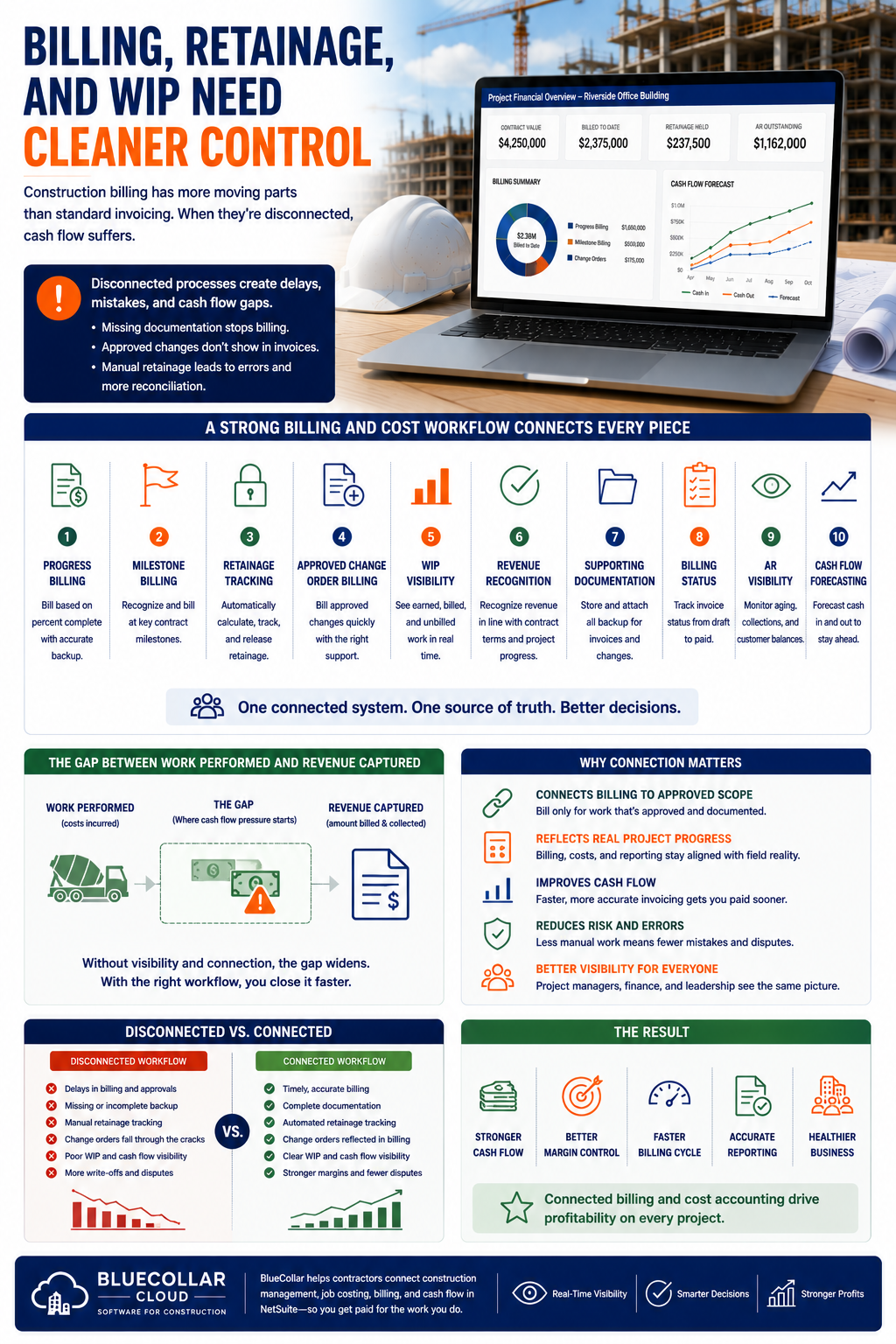
Construction billing is more complex than standard invoice creation. Contractors deal with progress billing, milestones, retainage, approved changes, supporting documentation, customer approvals, revenue timing, and WIP reporting. If these pieces are disconnected, cash flow becomes harder to manage.
A project may have completed billable work, but billing cannot proceed because the project record is missing supporting documentation. A change order may be approved in the field but not reflected in the billing workflow. Retainage may be tracked manually, leading to additional reconciliation and greater room for error.
A stronger billing and cost workflow should support:
- Progress billing.
- Milestone billing.
- Retainage tracking.
- Approved change order billing.
- WIP visibility.
- Revenue recognition.
- Supporting documentation.
- Billing status.
- AR visibility.
- Cash flow forecasting.
This is where construction billing software and project cost accounting need to work together. Contractors need billing connected to approved scope, project progress, contract terms, cost movement, and financial reporting.
A connected view of construction management, job costing, billing, and cash flow helps contractors understand the gap between work performed and revenue captured. That gap is often where cash flow pressure begins.
Forecasting Cost To Complete Helps Contractors Act Earlier
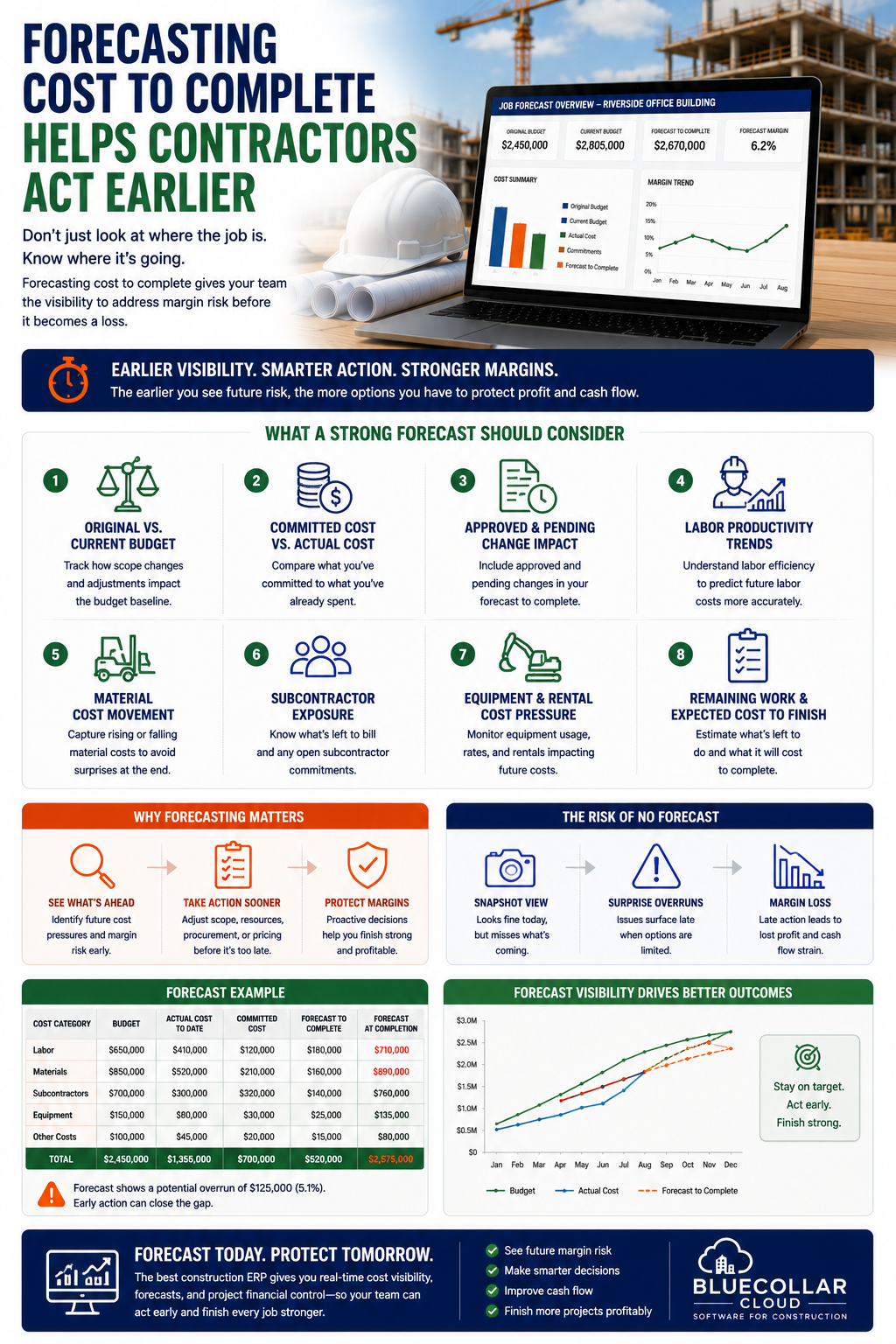
Actual cost is important, but it only tells part of the story. Contractors also need to know where the job is heading. Forecasting cost to complete gives project managers, finance, and leadership a better chance to see future margin pressure before the job is already underwater.
A job may look fine based on actual cost today, but committed costs, remaining labor, pending changes, material movement, and subcontractor exposure may tell a different story. Without forecasting, the company can mistake a temporary snapshot for a reliable financial picture.
A stronger forecast should consider:
- Original budget versus current budget.
- Committed cost versus actual cost.
- Approved and pending change impact.
- Labor productivity trends.
- Material cost movement.
- Subcontractor exposure.
- Equipment and rental cost pressure.
- Remaining work and expected cost to finish.
Contractors comparing the best construction ERP options should look closely at forecast visibility. A system that only reports actual cost may not give project teams enough time to respond.
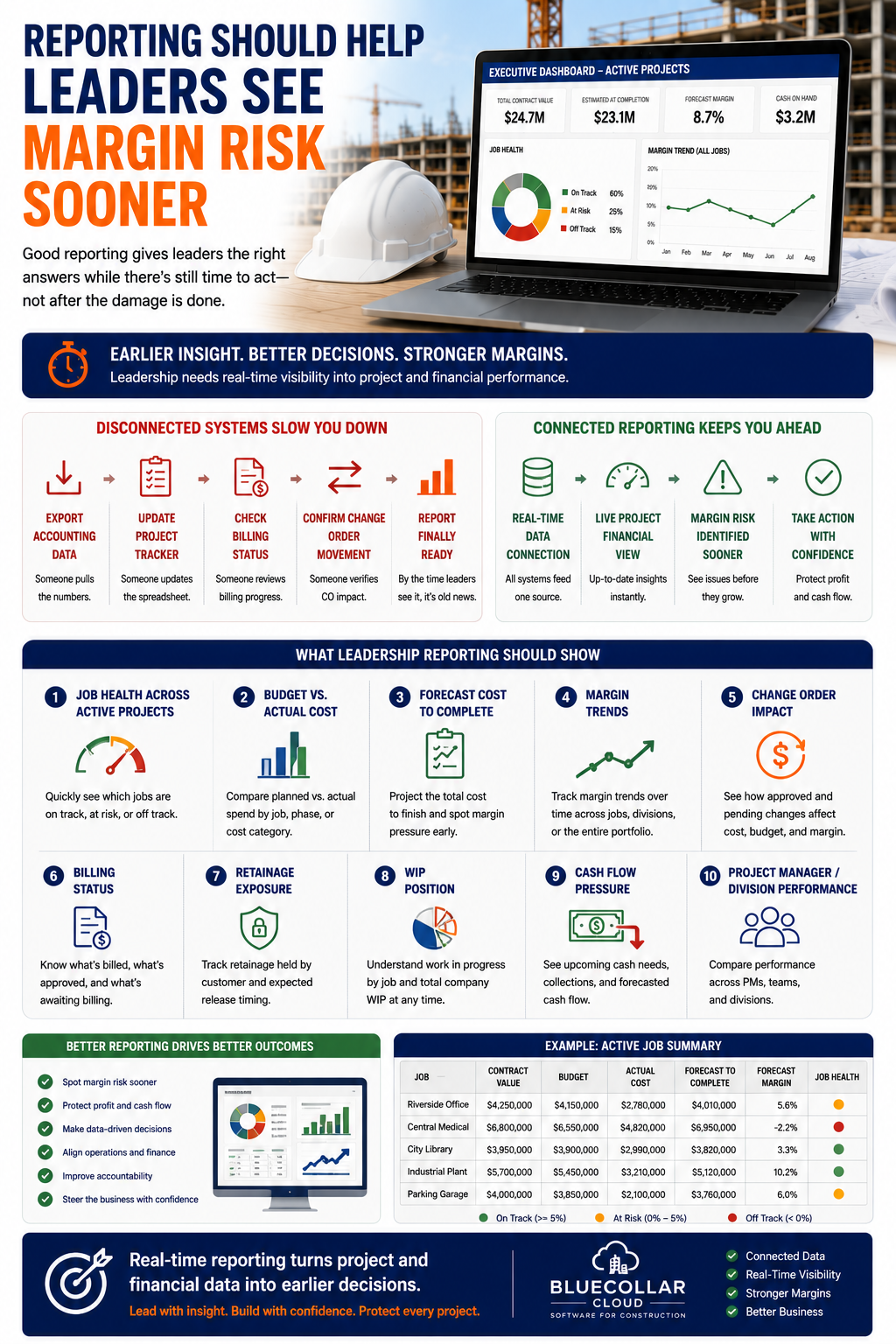
Reporting Should Help Leaders See Margin Risk Sooner
Leadership reporting should not require a week of spreadsheet cleanup. Executives need to know which jobs are healthy, which jobs are slipping, where cost categories are trending over budget, where change orders are affecting margin, and where cash flow may tighten. They need answers while there is still time to act.
Disconnected systems slow that down. Someone exports accounting data. Someone updates a project tracker. Someone checks billing status. Someone confirms the change order movement. The final report may be polished, but by the time leadership sees it, the business may already be dealing with a different reality.
Reporting should show:
- Job health across active projects.
- Budget versus actual cost.
- Forecast cost to complete.
- Margin trends.
- Change order impact.
- Billing status.
- Retainage exposure.
- WIP position.
- Cash flow pressure.
- Project manager or division performance.
Better NetSuite ERP leadership strategies for construction turn project and financial data into earlier decisions. Leaders need reporting that helps them steer the business, not reporting that only explains what already went wrong.
Why Contractors Need Software That Fits Construction Workflows
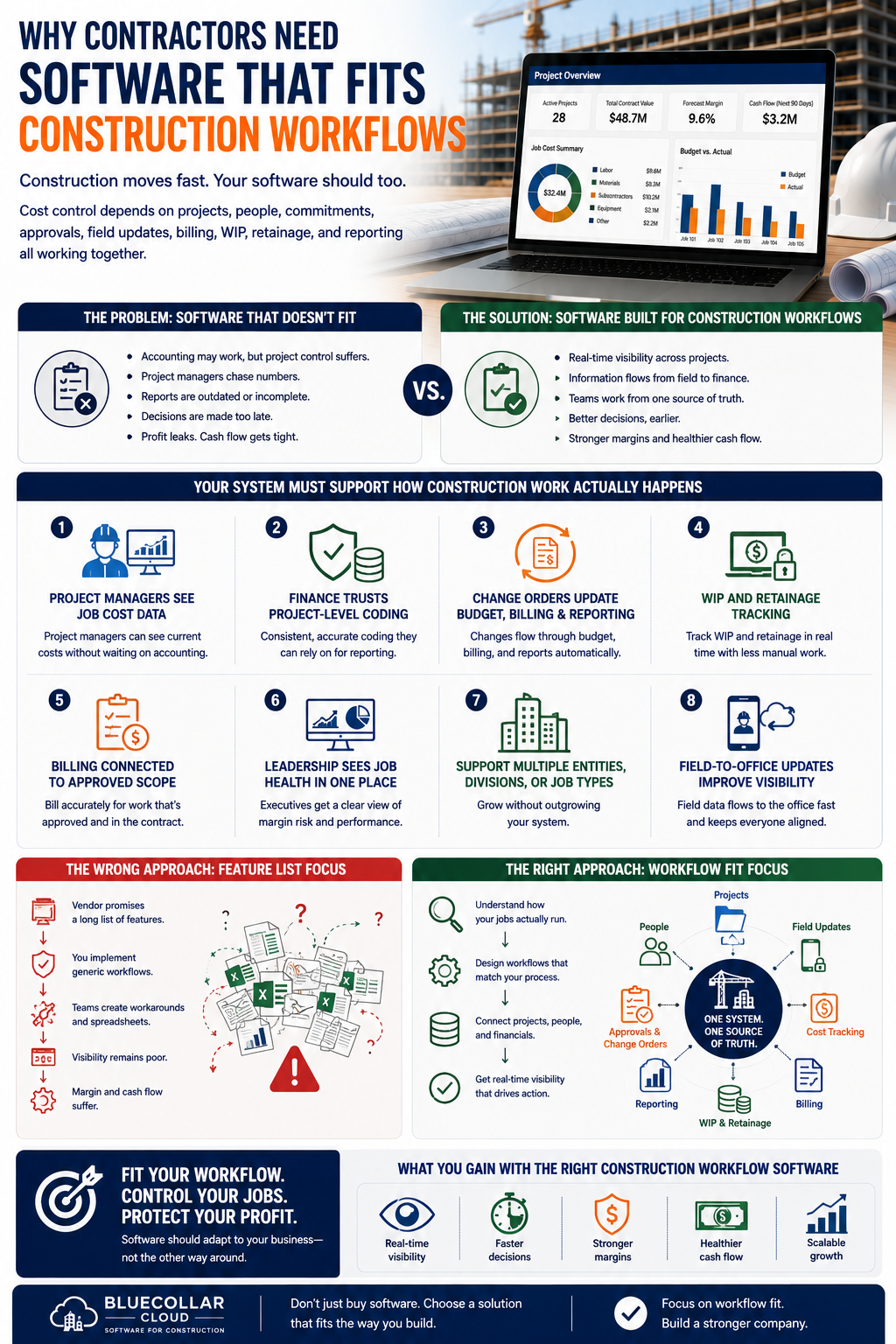
Contractors should avoid choosing software only because it handles accounting. The better question is whether the system supports how construction work actually moves. Cost control depends on projects, people, commitments, approvals, field updates, billing, WIP, retainage, and reporting all working together.
A generic accounting workflow may help the finance team close the books, but it may not help project managers control jobs. If the people running the work cannot see current cost data, the company still has a visibility problem.
Contractors should ask whether the system can support:
- Project managers seeing job cost data without waiting on accounting.
- Finance trusting project-level coding.
- Change orders updating budget, billing, and reporting.
- WIP and retainage tracking.
- Billing connected to approved scope.
- Leadership seeing job health in one place.
- Multiple entities, divisions, or job types.
- Field-to-office updates that improve financial visibility.
A strong ERP for construction industry workflow should fit the way contractors manage jobs. Teams comparing the best ERP software for construction should look beyond the feature list and focus on workflow fit.
Where NetSuite And BlueCollar Fit For Construction Cost Accounting
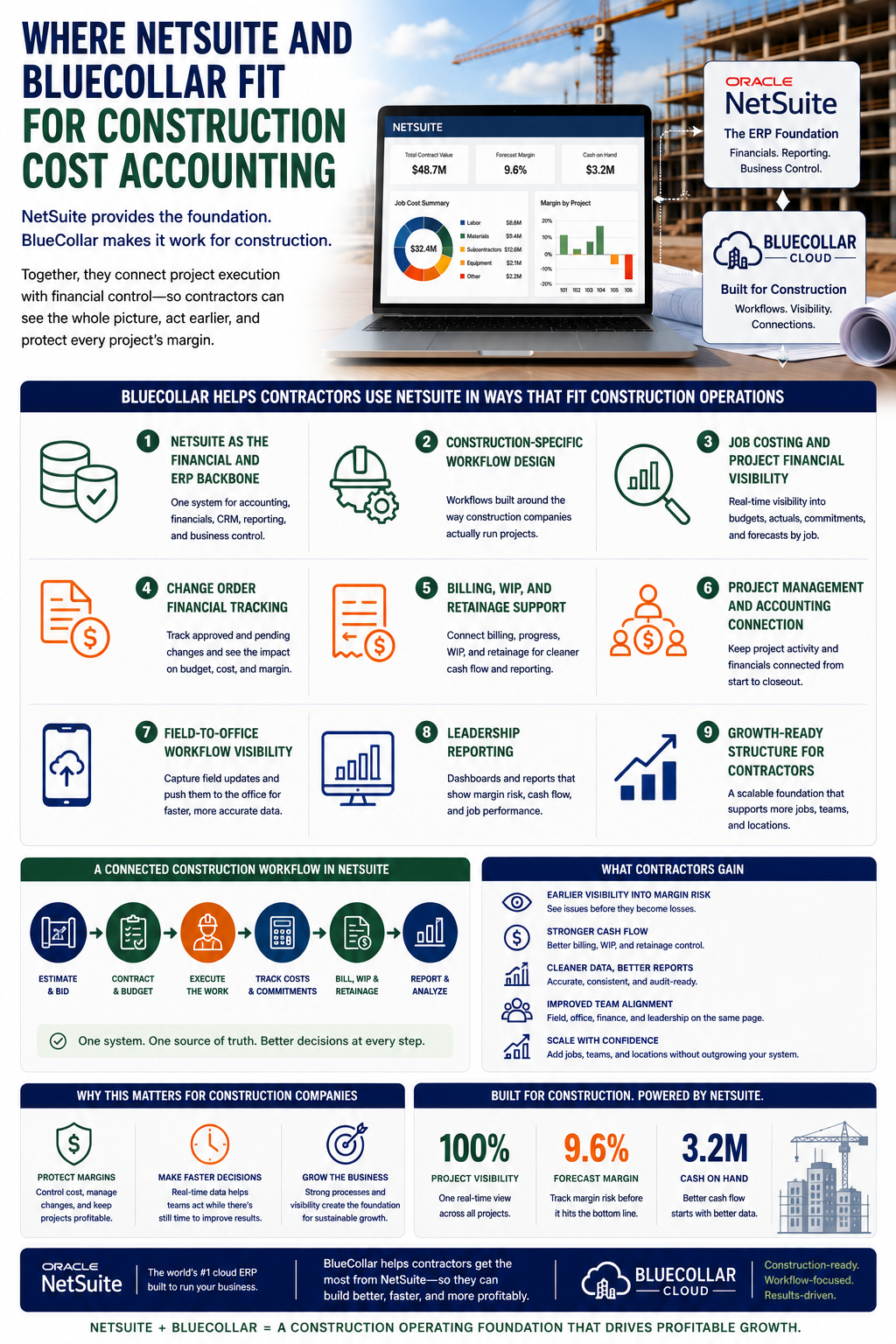
NetSuite can provide the ERP foundation contractors need for accounting, financials, reporting, and business control. For construction companies, value grows when the foundation is built around job costing, billing, WIP, retainage, project management, scheduling visibility, and field-to-finance workflows.
BlueCollar helps contractors use NetSuite in ways that fit construction operations. That means helping connect accounting with project financial visibility, job cost movement, billing status, change order impact, and leadership reporting. The goal is not just to install a system. The goal is to give contractors a cleaner way to run the business.
BlueCollar can support:
- NetSuite as the financial and ERP backbone.
- Construction-specific workflow design.
- Job costing and project financial visibility.
- Change order financial tracking.
- Billing, WIP, and retainage support.
- Project management and accounting connection.
- Field-to-office workflow visibility.
- Leadership reporting.
- Growth-ready structure for contractors.
Contractors evaluating NetSuite for construction companies often need more than finance software. They need a construction-ready operating foundation. That is also why NetSuite for construction is changing the game and is really about connecting project execution with financial control.
Questions To Ask Before Choosing Construction Cost Accounting Software
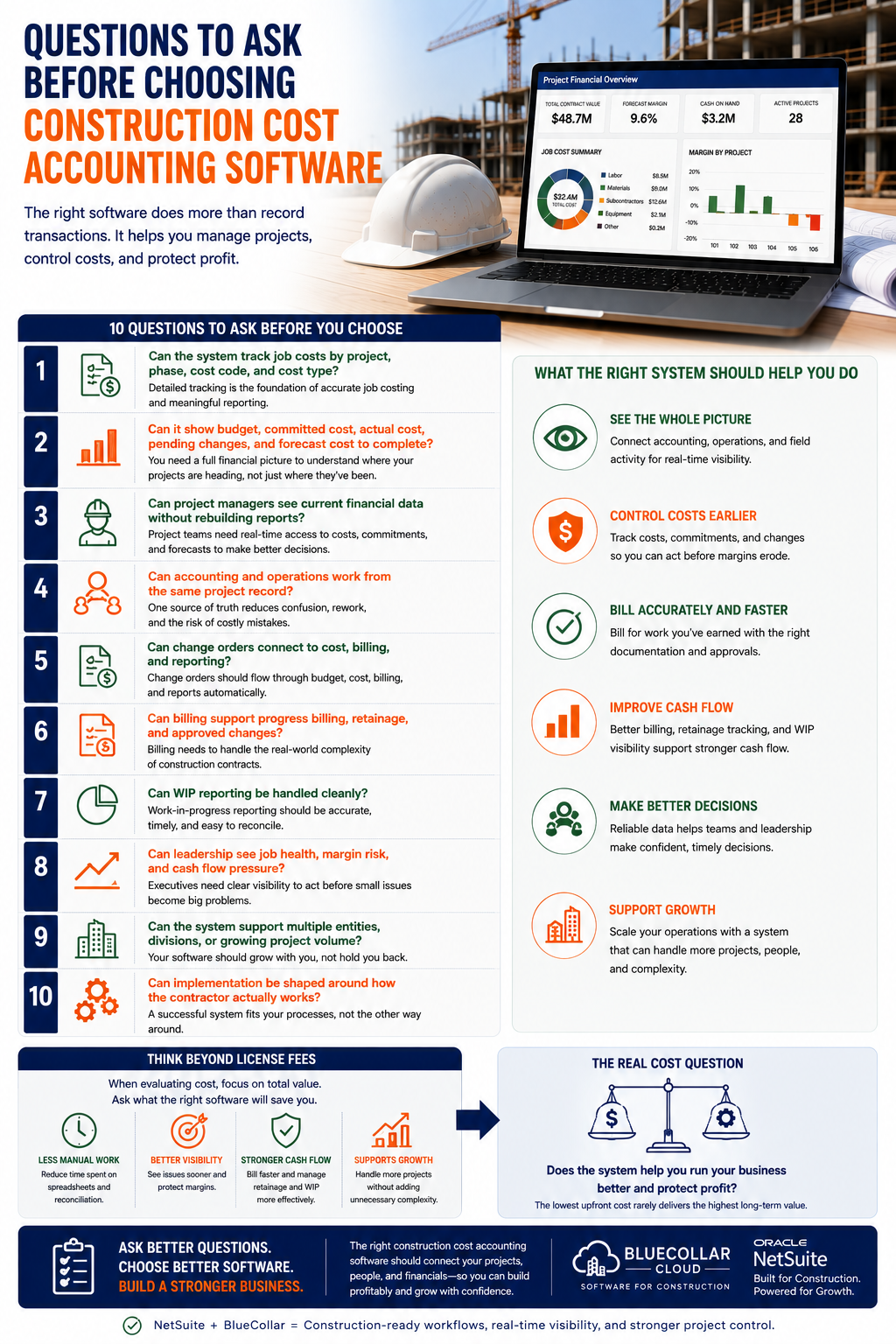
Choosing construction cost accounting software should not be treated like a basic accounting purchase. Contractors need to know whether the system can handle job-level financial control, project visibility, billing complexity, and growth. They also need to know whether implementation can be shaped around how the team actually works.
Useful questions include:
- Can the system track job costs by project, phase, cost code, and cost type?
- Can it show budget, committed cost, actual cost, pending changes, and forecast cost to complete?
- Can project managers see current financial data without rebuilding reports?
- Can accounting and operations work from the same project record?
- Can change orders connect to cost, billing, and reporting?
- Can billing support progress billing, retainage, and approved changes?
- Can WIP reporting be handled cleanly?
- Can leadership see job health, margin risk, and cash flow pressure?
- Can the system support multiple entities, divisions, or growing project volume?
- Can implementation be shaped around how the contractor actually works?
Teams reviewing NetSuite ERP cost should think beyond license fees. The real cost question is whether the system reduces manual work, improves visibility, supports growth, and helps the company protect profit.
Build Better Construction Cost Control With BlueCollar
If your team is spending too much time chasing down project costs, rebuilding reports, or trying to figure out which numbers are current, BlueCollar can help. We help contractors turn NetSuite into a construction-ready operating foundation for job costing, billing, WIP, retainage, project financial visibility, and reporting.
Better cost control starts with connected information. Project managers, accounting, and leadership should not have to work from separate views of the same job. They need one cleaner financial picture that helps them act sooner.
Book a demo to see how BlueCollar helps contractors connect accounting, operations, and project cost control.
Frequently Asked Questions About Construction Cost Accounting Software
What Is Construction Cost Accounting Software?
Construction cost accounting software helps contractors connect accounting activity to project-level financial performance. It can support job costs, budgets, commitments, actuals, change orders, billing, retainage, WIP, forecasting, and reporting. The goal is to help contractors understand where money is going while work is still active. That gives project managers, finance teams, and leaders a clearer view of job health.
How Is Construction Cost Accounting Different From Regular Accounting?
Regular accounting tracks the company’s overall financial activity, including bills, invoices, payroll, cash, and financial statements. Construction cost accounting goes deeper into job-level performance across projects, phases, cost codes, cost types, commitments, changes, and forecasts. Contractors need that detail because profit is earned or lost at the project level. A standard accounting report may be accurate yet not provide project teams with enough information to manage the job.
Why Do Contractors Need Better Job Costing?
Contractors need better job costing so they can see where money is being spent before the margin is gone. Good job costing shows budget, actual cost, committed cost, pending changes, approved changes, and expected cost to complete. It helps project managers respond earlier and gives leadership a clearer view of risk across active work. It also gives estimators better historical data for future bids.
Can Construction Cost Accounting Software Help With Change Orders?
Yes, robust software can help contractors track change order approval status, cost and billing impacts, forecast changes, supporting documentation, and reporting. Change orders should not sit outside the project financial workflow. They affect budget, margin, billing, cash flow, and project visibility. A connected process helps contractors avoid missed billing and delayed financial updates.
Can It Help With Retainage And WIP?
Yes, construction cost accounting software should help with retainage, progress billing, WIP visibility, revenue timing, and project financial reporting. These areas are difficult to manage well through disconnected spreadsheets. Retainage and WIP both affect cash flow and leadership visibility. A cleaner workflow gives finance and operations a clearer view of what has been earned, billed, held, and collected.
When Should A Contractor Move Beyond Basic Accounting Software?
A contractor should consider moving beyond basic accounting software when job cost reports arrive late, project teams rely on spreadsheets, billing is delayed, change orders are hard to track, or WIP and retainage require too much manual work. Multi-entity needs, higher project volume, and leadership reporting problems are also signs. The right time is usually before the old system begins to slow growth. Waiting too long can make cleanup and implementation harder.
What Should Contractors Look For In Construction Cost Accounting Software?
Contractors should look for job costing, commitments, actuals, forecasting, change orders, billing, retainage, WIP, reporting, project manager visibility, accounting integration, and growth support. The system should integrate accounting and operations rather than forcing each department into separate workflows. It should also support how the contractor actually manages jobs. Ease of reporting and implementation fit are just as important as the feature list.
How Does BlueCollar Help With Construction Cost Accounting?
BlueCollar helps contractors use NetSuite for construction-focused cost accounting workflows. That can include job costing, project financial visibility, billing, WIP, retainage, reporting, and field-to-finance connection. BlueCollar helps shape NetSuite to reflect the realities of construction work, rather than leaving contractors with a generic ERP setup. The result is a cleaner operating foundation for project cost control and growth.